The Agent Instead of Chat: Data Analysis Without Copy-Paste
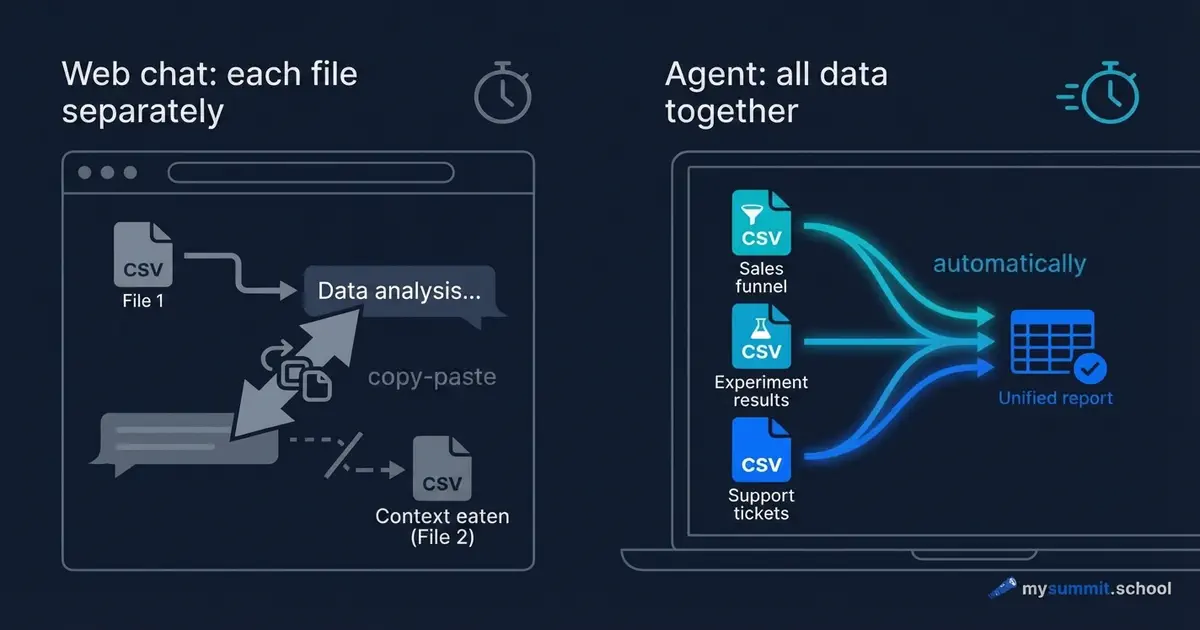
You have three data files: an activation funnel, A/B test results, and support tickets. The task – figure out why onboarding is underperforming. You open ChatGPT, upload the first file, ask your question. You get an answer. You upload the second file. ChatGPT asks: “Can you remind me of the context?” You upload the third. The context of the first file has already been pushed out.
Forty minutes later you have three separate conversations, none of which answer the original question. Because the question was one, and the data was in three places.
This isn’t a ChatGPT problem. It’s a problem of approach.
Two Ways of Working with Data
The difference between “chat in a browser” and “agent on your laptop” isn’t about model power. It’s about who goes to whom.
In chat, you bring the data to the model. Piece by piece, through file uploads, within a single conversation. The model answers what it sees right now. The next message – already a slightly different context.
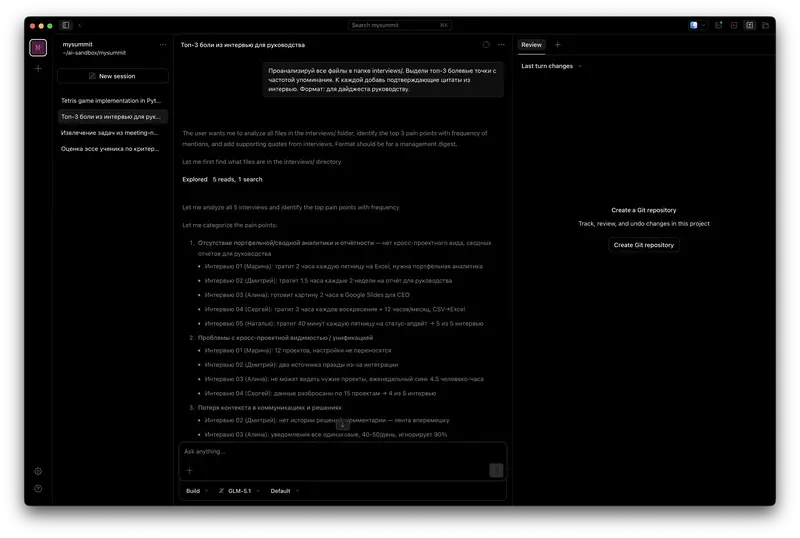
In agent mode, the model comes to your data. The agent installs as a regular application on your laptop, sees the folder with your files, and works with them directly – like an analyst who’s been given access to your computer. You write the task in plain text, as you would in Slack – it reads the files, calculates, saves the result. This is the same BYOA idea – but in its practical, not conceptual, dimension.
The difference looks technical. In practice, it changes everything.
A Concrete Task, Two Ways to Solve It
Imagine a real scenario. A product manager at a SaaS service notices: new user-to-active conversion has been stuck at 38% for four months straight. There are three data tables.
The first – an onboarding funnel: registration, first action, second action, inviting a colleague.
The second – results of an A/B test of a new onboarding feature: control and test groups of 500 companies each.
The third – 350 support tickets from new users over the last quarter.
The question: at which step are we losing people, why, and did the experiment work?
Option 1: ChatGPT, Web Interface
You upload the funnel. ChatGPT analyzes it and finds the main drop-off point. Good. You upload the tickets – you want to understand what users complain about at that specific step. ChatGPT says: “I see the tickets. Remind me which step had the drop?” You explain. It analyzes.
You upload the test results. New file. ChatGPT sees them, but no longer remembers the exact funnel numbers from the first file – which segment had 55% conversion and which had 38%. To compare, you have to manually copy numbers from the first conversation and paste them into the third.
The result after an hour: three separate conclusions that need to be merged manually into one. And there’s still the question: what if it rounded something somewhere, or mixed up the rows? You can’t verify that.
Option 2: An Agent on Your Laptop
You open the folder with the three tables and write to the agent in a single message – as you would to an analyst on Slack:
“Look at the activation funnel. Find the main drop-off point. Then open the tickets and see which complaints relate to that step. Finally, check the test results – did the experiment work overall and for the main customer segment.”
The agent opens all three files. Reads them. Writes code to analyze the funnel, runs it, gets numbers. Moves to the tickets, groups them by topic, counts frequencies. Loads the test data, compares groups, checks the statistics. Results from all three files are in a single context simultaneously.
The whole process takes a few minutes. You see exactly how the agent calculated – and you can verify each step.
Agentic data analysis is one of the topics in the course. Try 9 practical manager tasks in the open module – free, no registration.
No payment required • Get notified on launch
What Changes in Principle
A few things that look small but define the difference in analysis quality.
The agent simultaneously sees that the third step of the funnel has a 45% drop, that 31% of tickets complain about exactly that step, and that in the experiment the target segment showed +13.8 pp. These three facts don’t need to be stitched together manually – they’re already in a single output.
On top of that, the agent preserves how it actually calculated. Tomorrow new data arrives for next month – you run the same analysis again without extra effort. It’s no longer a one-off question, it’s a routine. This is exactly where the hidden AI tax hides: 37% of the time saved goes to verifying and redoing the result. When you have the code, you can verify it in seconds.
Finally, the agent points to specific rows in the table. You can open the source file and check. In chat, the model says “most mid-market companies” – and it’s impossible to tell whether that’s a real pattern or a hallucination.
When the Agent Still Hallucinates
An honest section, because the agent isn’t magic.
The agent hallucinates in the same place as chat: when it formulates interpretations rather than calculates. When it calculates – you see the result of a specific computation. But when the agent says “this points to a UX problem” – that’s its interpretation, and it can be wrong.
A good technique: after any conclusion, ask the agent “show which rows of the table this follows from.” The agent should respond with concrete examples or show a data slice. If it starts explaining in words without referring back to the data – it’s interpreting, not reading.
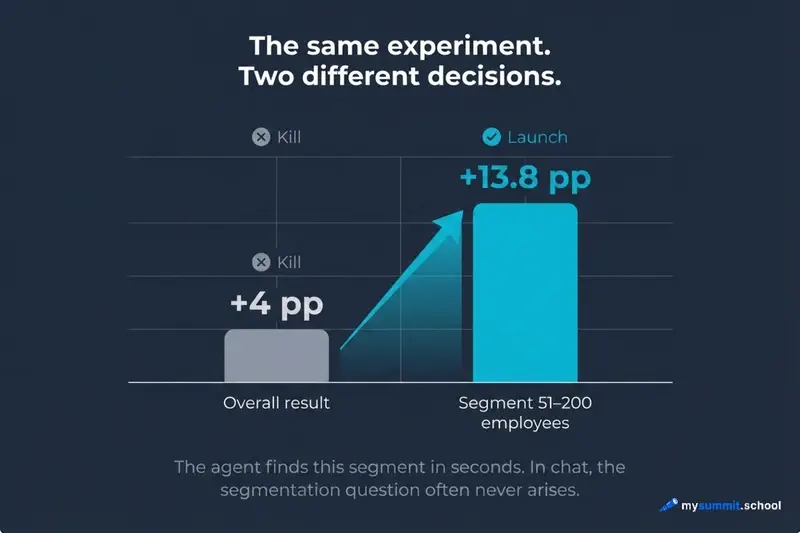
Second point: the agent doesn’t know your business context. It finds that in the test group, conversion grew by 4 pp overall and by +13.8 pp in the 51–200 employees segment. But the conclusion “roll out to 100% or not” is yours. For that you need to know which segment is the target, what the market looks like, what the development cost is.
The agent provides accurate data. You make the decision.
What the Real Analysis of Three Files Shows
Let’s look concretely at what the agent finds in such a dataset.
Activation funnel (500 companies). The agent calculates conversion at each step. First step – 77%, relatively normal. Second step – 55%. This is the problem: of the 385 companies that completed the first action, only 210 move to the next. More than half of the potential active users are lost here.
The agent frames this as “the main drop-off is the transition between step 2 and step 3, 45% don’t progress.” Median time – 8 hours, whereas the first step took 2 hours. So users are coming back, but not completing the next action.
Support tickets (350 total). The agent groups them by topic. Discovers: 31% of tickets are the question “how do I add an object manually?” Another 27% – problems connecting an external source. 19% – file uploads.
This confirms the funnel hypothesis: people don’t understand how to do the second action. The UX is not obvious.
The agent takes an additional step that in chat you probably wouldn’t have asked for: it segments the tickets by company size. It finds that mid-size companies (50–200 employees) ask the manual-add question twice as often as small ones. This is the product’s target segment – which makes the problem more important.
Test results (1,000 companies, two groups). Topline: control 38.4%, test 42.4%, uplift +4 pp – looks disappointing. More was forecast, the statistics are borderline.
The agent segments by company size. In the 51–200 employees segment: control 39.2%, test 53.0%, uplift +13.8 pp – a strong result. The experiment worked exactly for the target segment.
That shift – from “failed experiment” to “win for the target segment” – the agent discovers because it holds all three files in context simultaneously. In chat you’d have to ask that question separately, and it’s not a given that it would even come up.
When You Don’t Need an Agent
Agent mode isn’t always justified.
If you need to quickly check an average in a small table of 50 rows – ChatGPT will handle it faster. No need to open an extra tool.
If the data is confidential and you don’t fully understand how the tool works – better sort that out in advance. Cloud models (ChatGPT, Claude) process data on the provider’s servers. That can be unacceptable for data under NDA. An agent running against a local model on your laptop is a different scenario, but it requires separate preparation.
If the task is to write text, brainstorm structure, discuss a decision – the agent offers no advantages. Its value is specifically in working with files.
Getting Started: Tools and Models
Among the tools that come up most often: Claude Code from Anthropic (requires an Anthropic subscription at around $100 per month, widely available), Kilo Code (a VS Code extension, good for people already working with code), and OpenCode (open source, works with any model).
The most flexible starting point is OpenCode paired with whichever provider fits your budget and constraints – OpenAI, Anthropic, DeepSeek, Kimi, and others are all supported. For very low-cost analysis, Kimi K2 and DeepSeek cost fractions of a cent per request and are genuinely competitive with GPT-4o on analytical quality with structured data.
OpenCode installs like any regular application and runs against the folder with your files. First analysis – within 15 minutes of installation. For more on how this works in practice, see the article on OpenCode. It also includes three tasks worth trying on the first day.
The agent reads files, calculates, segments data. Put your own analysis approach to the test on 9 real manager tasks – free, no registration.
No payment required • Get notified on launch
What Changes in the Work Itself
Agentic analysis isn’t a replacement for an analyst. It’s a way to remove friction between the question and the answer.
Previously, between “I want to understand why the metric is slipping” and “here’s the analysis across three files with segmentation” – there were several hours of work, or a request to an analyst with a turnaround of several days. Now – a few minutes.
This changes which questions get asked at all. When analysis is expensive, only the important questions get asked. When it’s cheap – people start checking hypotheses that previously seemed not quite important enough to ask about.
In our three-file example, that’s exactly what happened. The topline of the test looked bad – +4 pp, borderline statistics. The standard conclusion: iterate or kill. But the agent segmented the data in seconds – and it turned out that for the target segment the result was strong (+13.8 pp). That’s a “ship it” decision instead of a “kill it” one.
Surprisingly, the most important thing here isn’t speed. What matters more is something else: analysis becomes reproducible. A month later, when new data arrives, you run the same analysis again. This is no longer a one-off answer – it’s an analytical routine.
It may be worth distinguishing two kinds of work with data: one-off questions (for which chat works well), and regular analytical routines (for which the agent changes the situation fundamentally). Most PM tasks that actually influence decisions – funnels, cohorts, experiments – are the second type.
What’s Next: An Agent on Your Data
This article showed one type of task – a one-off analysis of three tables. But the real value of an agent appears later: when analysis stops being one-off and becomes routine.
At that point it’s no longer “using an agent,” it’s “building a personal agent” – with its own routines, connected to your real data.
That’s exactly what the course “Personal Agent for Managers,” which we’re launching, is about. A few concrete things on top of this article:
- You start with real data from day one – by the third day of the course the agent works with your actual email. You export it as a regular file on your laptop, without involving IT.
- As the course goes on, you build up a set of ready-made scenarios for your tasks – they stay with you after the course.
- After each block, you upload the result of your work and receive personal feedback – not self-assessment, but real review.
- Live Q&A with the author, a Telegram channel for classmates, case discussions.
- The course is built on tools that are practical and affordable. Total cost for the model requests across the whole course – a few dollars.
The course is getting ready to launch. If you want to be in the first cohort – the signup form is just above.
The Tool Exists. Now – The Skill
While the Personal Agent course is getting ready to launch, start with the basics: the course foundation covers prompt engineering and critical thinking – without them the agent produces numbers, not insights. The Product Management specialization covers AI data analysis and working with agents on PM tasks.


Stanislav Belyaev
Engineering Leader at Microsoft18 years leading engineering teams. Founder of mysummit.school. 700+ graduates at Yandex Practicum and Stratoplan.