How to Implement AI in Manufacturing: A Step-by-Step Guide for Plant Leaders
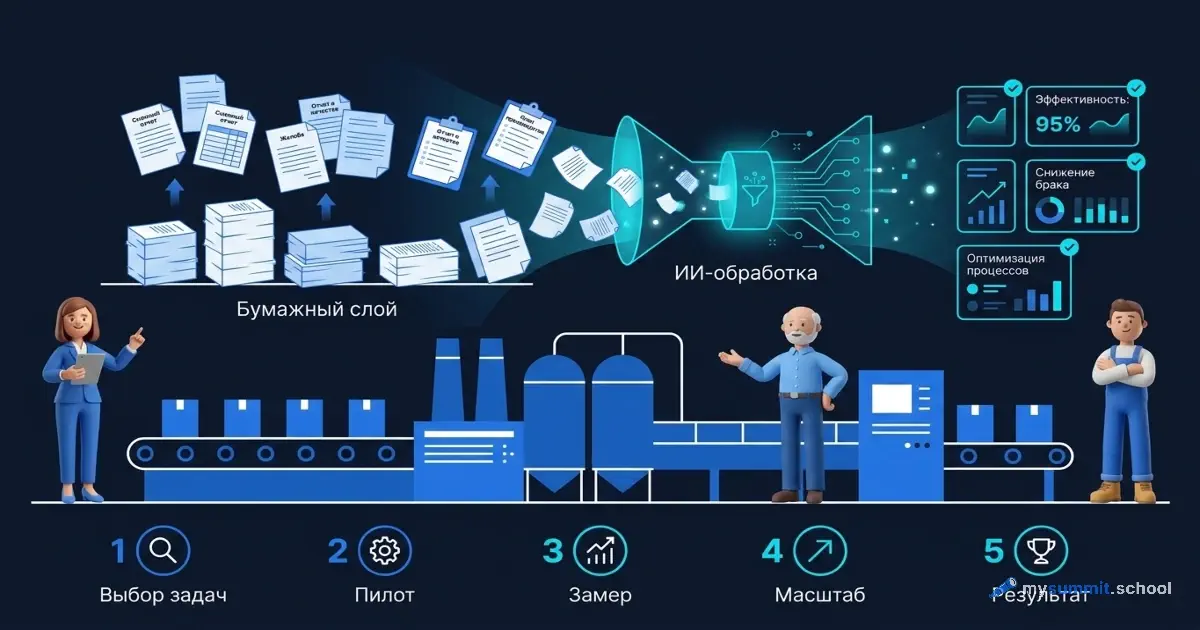
A shift supervisor at a mid-size machining plant spends 40 minutes every morning filling out the shift report. Manually copying equipment readings into a Word template, describing incidents in free text, cross-checking the safety log. This routine has existed since the 1970s and hasn’t changed by a single minute. AI can cut it to ten. The hard part isn’t the technology. The hard part is knowing where to start.
Why AI in Manufacturing Isn’t About Robots or IoT
When senior leaders at industrial companies hear “AI in manufacturing,” the first thought is production line automation, computer vision for quality control, predictive maintenance. All of that exists and works – but requires 6 to 24 months of implementation, PLC integration, sometimes equipment replacement, and serious budgets.
Generative AI is an entirely different conversation. It works with text – and manufacturing is drowning in text. Shift reports. Supplier complaints. Maintenance requests. Defect maps. Safety logs. Meeting minutes from daily standups. None of these documents control a conveyor directly – but each one consumes the time of an engineer or a manager, who ends up structuring information rather than solving technical problems.
And here’s something that’s often overlooked: modern models aren’t limited to typed text. They read photographs and handwritten notes – a snapshot of a paper safety log, a hand-filled defect card, readings from an old analog gauge. Unlike traditional OCR software that needs templates and precise recognition zones, a multimodal model parses even messy handwriting and immediately transfers the data into the right structure. For manufacturing, where mountains of paperwork are still filled out by hand, this removes yet another barrier – and it’s worth trying on a couple of real pages.
This point deserves emphasis: the real input on most shop floors isn’t a neatly dictated voice memo from a phone, but a beaten-up shift log filled out in pencil at the end of a 12-hour rotation. If you want to test the idea on your own site in one evening, do exactly that: photograph one page of a real logbook with your phone and ask an AI assistant – ChatGPT, Claude, Gemini – to turn it into a structured report. That’s the honest viability test, not an invented scenario with a dictated note.
And here’s what matters about the nature of this technology. According to McKinsey, roughly three quarters of all the economic value of generative AI falls on text and knowledge work – customer service, marketing and sales, software development, R&D. Manufacturing as an industry isn’t at the top of that list – precisely because AI doesn’t operate the machine. But every plant has its own layer of text-based work, and that’s exactly where the entry point is.
In the Global Lighthouse Network – advanced factories selected by the World Economic Forum and McKinsey – there’s a telling pattern: every new member already has a generative AI pilot running, and nearly all of them are in areas where data is least structured. Technician advisors, operator assistants, engineering copilots, automated PFMEA generation, supplier risk prediction. Most such pilots launch in days or weeks, not months. In other words, the world’s most advanced factories enter generative AI through that very paper layer – not through the machine.
The idea is simple: AI takes over the paper layer around manufacturing operations. It doesn’t operate the machine – it helps describe what happened to it.
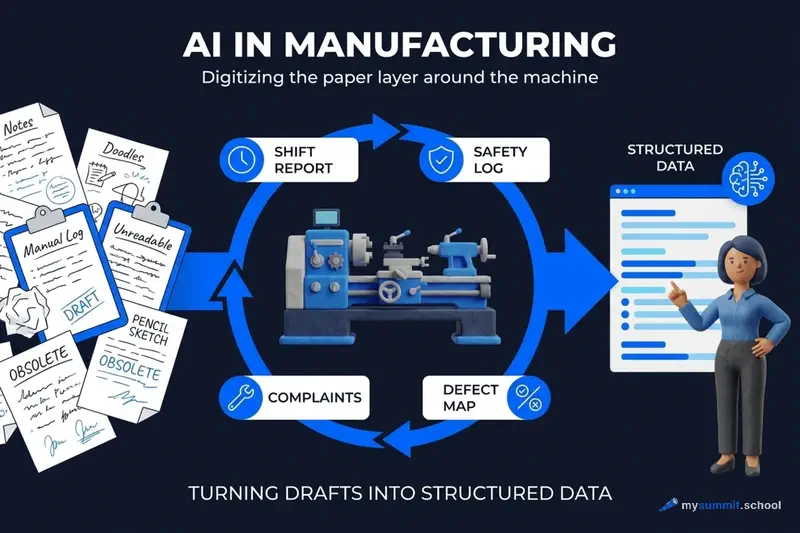
This means the entry barrier is considerably lower than most people assume.
Who’s Already Doing This: Factory Cases
The gap between early movers and everyone else in manufacturing AI is striking – and it’s widening. Companies that started adoption systematically, rather than haphazardly, see fundamentally different results. As the MIT research on the GenAI divide shows, the gap between leaders and laggards is defined not by budget or technology – it’s defined by structure.
Take Sachsenmilch in Germany: 4.6 million liters of milk per day, 24/7 production. They abandoned fixed-schedule maintenance entirely and moved to predictive: the system analyzes vibration and component condition and warns of failure in advance. One pump replaced on time saved hundreds of thousands of euros. “We orient ourselves not by the maintenance schedule, but by the actual condition of the equipment,” says the plant’s technical director.
According to BCG, a shop-floor GenAI assistant suggests repair strategies to maintenance technicians – down to the specific parts needed and their warehouse availability – cutting preparation time from hours to minutes. This is still the same paper layer, just pushed right up against the machine: AI doesn’t turn the wrench, but it instantly assembles and structures the knowledge about what to fix and how.
Paradox, isn’t it? Plants with rigid safety standards and strict regulations often adopt AI less systematically than startups with no processes at all.
These factories started with one person and one task. Try AI on 9 real management tasks – free, no registration required.
No payment required • Get notified on launch
Step 0. Get Security Clearance Before You Open a Browser
This step is missing from nearly every article about AI – and it’s the one that kills more pilots before they start than anything else. In manufacturing, you can’t just open a browser and paste a shift report into a cloud AI tool: the internal network is monitored, the facility has a security team, the company has trade secret policies, and some orders come with NDAs or restricted customer data.
What you need to resolve before Step 1 – typically a half-page memo addressed to IT security and the plant director:
- Which tool you’re using (e.g., ChatGPT Enterprise with SOC 2 compliance, or a locally deployed model via Ollama).
- What data will go in – and what absolutely won’t (customer names, restricted order numbers, proprietary process know-how).
- Who specifically will use the tool (one shift supervisor, by name) and for how long (a 4-week pilot).
- Who takes responsibility if something leaks.
At most plants, this approval takes three days to two weeks. If you skip it, the typical scenario is: on the third week, the SOC or security team notices the traffic, the tool gets blocked at the perimeter, and the pilot leader gets called in for a conversation. After that, there usually won’t be a second attempt this year.
One more practical constraint that office-based planners rarely consider: are personal mobile phones allowed in the production zone? At many facilities – no. That means the appealing scenario of “dictate a voice memo on the walk to the locker room” doesn’t work, and the entry point becomes either a shared terminal in the supervisor’s office or a photo of the logbook taken outside the shop floor.
Step 1. Pick One Task from the “Paper Layer”
The rule of the first step is strict: one task, not five. Manufacturing managers tend to think big – they want to automate safety documentation, procurement requests, and holding-level reporting all at once. That’s a path to nothing working.
Here are tasks that work well as a starting point:
- Shift report – voice memo or rough notes turned into a structured document with sections on equipment, incidents, quality, and open items. Ideal for a first experience: it repeats daily, and results are visible immediately.
- Weekly OEE summary (Overall Equipment Effectiveness) – export from MES or SCADA turned into a root-cause analysis of the top three downtimes with proposed actions.
- Supplier complaint – defect description plus part passport turned into a formal claim in the right format.
- Part lookup by specification – a text description (“1/4” NPT internal thread, check valve rated 3000 psi, cracking pressure 10 psi") turned into a list of manufacturers, series, and part numbers for ordering. This is possibly the most underrated task: field engineers note that each such search saves 8–10 minutes, and at shop-floor scale that adds up to hundreds of hours per year. An important caveat – more on this below, in the risks section.
- Defect card – QC inspector’s verbal description plus a photo turned into a structured PFMEA record.
- Monday standup – last week’s production data turned into a meeting agenda with key numbers and questions.
- Incident investigation report – facts gathered in random order turned into a structured report in the required format.
A useful test for selection: the task should repeat at least weekly and take more than 20 minutes of mechanical work. That means improvement will be noticeable within days.
Step 2. Choose a Tool with Security in Mind
Manufacturing isn’t an office. Data storage requirements apply, along with data privacy regulations (GDPR and its equivalents), and often trade secret restrictions. So the tool choice starts not with functionality, but with the data question.
| Tool | Deployment | Data | Best For |
|---|---|---|---|
| ChatGPT Enterprise/Team | Cloud (SOC 2, data not used for training) | Encrypted, not used for training | Most plants with cloud approval |
| Claude (Anthropic) | Cloud (SOC 2) or AWS | Not used for training | Teams already on AWS |
| DeepSeek via Ollama | Fully local | Never leaves the server | Air-gapped facilities |
| Gemini | Google Cloud | Google’s data policies | If already on Google Workspace |
For most manufacturing enterprises, the right starting point is ChatGPT Enterprise or Claude – both offer enterprise-grade data handling with SOC 2 compliance and explicit commitments not to train on your data. For air-gapped or highly restricted facilities, DeepSeek via Ollama runs entirely on-premises – data never leaves the server, no internet required.
One more practical argument in favor of a ready-made tool: don’t build your own. According to MIT data, off-the-shelf solutions pay off roughly twice as often as custom development – 67% successful deployments versus 33% – and the highest returns come not from flashy “wow projects” but from mundane back-office automation. Which is exactly that paper layer.
A separate conversation – DeepSeek. An open-source model you can run via Ollama on any company server, even without internet. Suitable for fully network-isolated facilities. Our detailed DeepSeek review will help you evaluate the model’s capabilities on management tasks.
For a comprehensive comparison of tools, see our GenAI tools comparison. For the first step, a free-tier web version of any major AI assistant is enough. You don’t need the IT department.
Step 3. Write Your First Prompt – Shift Report Example
This is the most important section of the article. Everything else is context. Here’s what you can do today.
Imagine: end of shift at a machining section. Shift supervisor Alex dictated a voice memo and jotted a few lines in a notebook. Here’s what he has:
“Shift 2, May 22. CNC lathe DMG CTX420 – downtime from 09:30 to 11:00 due to tool T3 replacement, wore out ahead of schedule. Lost 12 parts from the plan. Milling center Haas VF-2 ran normally all day. Found scoring marks on a batch of 40 shafts (serial numbers 2241–2280) – sent to QC, awaiting decision. Output – 87% of plan. Foreman Petrov reports spindle vibration on CNC lathe Mazak QT-350, needs checking tomorrow. All normal, no safety incidents.”
Now, the prompt. A good prompt for a manufacturing task consists of five elements: the role, context (manufacturing specifics), task, output format, and constraints. And to get consistent results from run to run, add a sixth – a short example showing how rough notes should become a finished report. This technique is called few-shot prompting: the model sees a sample and holds the format.
Click “Run” in the block above – the prompt will run on GPT-4.1 and DeepSeek right here, so you can compare the outputs. The result is a structured report in a couple of minutes instead of 30–40. The example inside the prompt (the few-shot) holds the format: both models produce identical structure, preserve the numbers, and automatically pull open items into the right section. But one rule stays ironclad: read the result. AI structures the text; you are responsible for the facts and the numbers.
Here’s what to check in the first result:
- Do all equipment codes match what’s in the notes?
- Did the AI add any “non-existent” details to the quality section?
- Does the format match what’s accepted at your company?
The prompt logic is the same as what works for management tasks in IT: clear role, specific context, explicit format. The only difference is the content – instead of sprints and Jira, it’s shifts and machine fleets.
We break down effective prompt structure in more detail in our prompt structure basics guide.
The shift report prompt is just the start. The open module covers 9 real management tasks where we examine mistakes invisible at first glance – free.
No payment required • Get notified on launch
Step 4. Overcome Resistance on the Shop Floor
This is where manufacturing differs from an IT company fundamentally. The resistance is different in nature and requires different answers.
“AI will replace workers” – the most common fear. It’s important to understand where it comes from: over the past 30 years, automation at many plants genuinely did mean layoffs. Trust in new technology is limited.
A more precise framing helps here. As the Benedict Evans analysis on the difference between a task and a job shows, AI almost never “eats” an entire profession – it takes over individual tasks. Elevator operators disappeared, but the number of accountants has grown many-fold over the past century, even though calculations were automated long ago. The same logic applies in manufacturing: AI takes over the typing task, not the shift supervisor’s job.
The answer here isn’t persuasion – it’s demonstration. Ask a shift supervisor to try the tool on one report. Don’t tell them what will happen. When they see that 40 minutes turned into 10, and that the “thinking” part was still up to them – the reaction changes. AI takes over the typing, not the production judgment.
“Our data is confidential” – a legitimate concern, and it’s addressed by tool selection. ChatGPT Enterprise and Claude both operate under SOC 2 compliance and don’t train on your data. DeepSeek via Ollama sends data nowhere at all – the server is on your premises, no internet needed.
“We don’t have an IT department for this” – good news: IT isn’t needed for the first step. A web browser, an account with an AI assistant, a prompt. That’s it. IT will be needed later – when results prove the value and it’s time to integrate with SAP or your ERP.
“Our people won’t learn it” – interestingly, the data doesn’t support this fear. BCG in 2025 found that GenAI adoption among frontline workers plateaued at 51% versus 78% for managers. The main reason was insufficient training quality, not lack of ability. Those who receive proper training learn the tool.
Moreover, at least in office work, AI helps weaker performers more: in a study by Harvard and BCG, consultants in the bottom half by performance gained 43% with AI, while top performers gained only 17%. This was an experiment with BCG consultants, not shift supervisors, so the number can’t be transferred literally. But the direction of the effect is worth remembering: the technology levels the playing field not by making strong performers weaker, but by ensuring that average employees are no longer the “weak link” when it comes to paperwork.
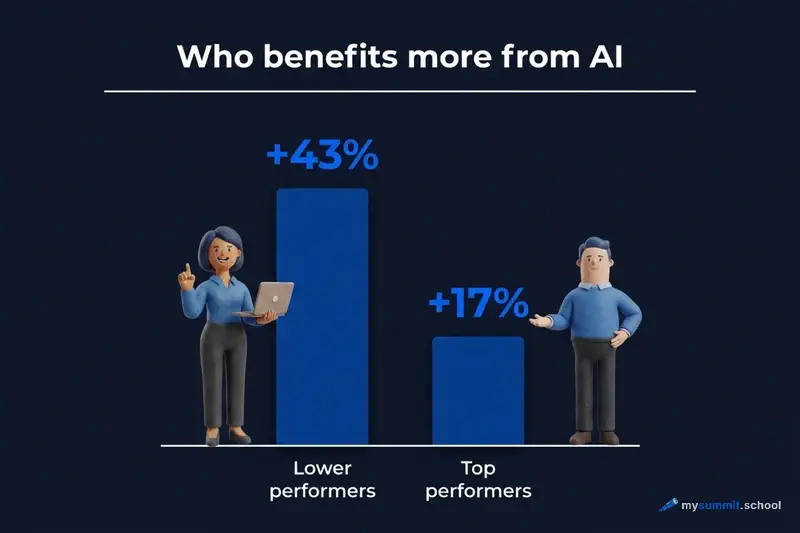
For manufacturing, this means a simple thing: the tool will benefit not the “star” of the department, but the ordinary shift supervisor who doesn’t consider himself tech-savvy. And the same BCG estimates that success of AI adoption in a factory is 70% determined by people and processes, 20% by data and infrastructure, and only 10% by the algorithms themselves. Technology is the smaller part of the equation.
Practical recommendation: start with one shift supervisor you trust who has some personal interest in technology. Don’t announce a corporate project, don’t run a mandatory training for everyone. Let one person try for a month – then show their results to colleagues. Horizontal spread works better than top-down directives.
And one more manufacturing-specific detail that doesn’t exist in office settings: with three-shift operations, a “single demo” doesn’t spread on its own. Shift workers physically don’t overlap – the night shift never sees what the day shift demonstrated. So as soon as the pilot proves its value with one person, the demonstration needs to be repeated at least three times – once per shift, ideally in person, not via chat. Otherwise, the night shift keeps writing reports by hand, and you’ll wonder why “the tool exists but nobody uses it.”
This same observation is confirmed by the analysis of why AI transformations fail to deliver results: organizational and cultural barriers tend to matter more than technical ones.
What Actually Takes a Week vs. Six Months
One source of disappointment in the early months is the feeling that “everything is equally easy.” It isn’t. It helps to keep an honest effort scale in view:
| What You Want to Do | People | Timeline | What You Need Beyond a Browser |
|---|---|---|---|
| Shift report from rough notes – web AI tool | 1 shift supervisor | 1–2 weeks | Nothing |
| Part lookup by spec, supplier complaint | 1 engineer + security approval | 2–4 weeks | Prompt templates, verification protocol |
| Scale to all shifts and sections | Department head + 1 coordinator | 1–3 months | Written templates, training, quality control |
| On-premises deployment (DeepSeek/open-source) for air-gapped facilities | IT team + security + 1–2 GPU servers | 2–4 months | Servers, MLOps, monitoring |
| ERP / MES / SCADA integration via API | IT project, external contractor, budget | 6–12 months | Security review, test environment, data migration |
The biggest mistake is promising leadership “full reporting automation within a quarter” after one good week on the web version. Between “one person types in a browser” and “reports automatically feed into the ERP” lie two levels of complexity and essentially a different project.
Step 5. Measure and Scale
Without measurements, adoption stays an experiment. With measurements, it becomes an argument for the next step.
Metrics that make sense in manufacturing:
- Shift report preparation time (before / after) – easy to measure, obvious result
- Number of supplier complaints filed per month (faster to draft = more get sent = faster problem resolution)
- Time from incident to completed investigation report (captures the speed of the paper process)
- Subjective rating by the shift supervisor on a five-point scale – simpler than it sounds, and informative enough
Three to four weeks after one task is running stably, take on the second. A good sequence for manufacturing:
- Shift report (weeks 1–2 for prompt refinement)
- Supplier complaint or defect report (weeks 3–4)
- Weekly OEE summary (month 2)
At this point, it’s worth considering whether you need a business case for the IT budget – say, for ERP integration via API. Three working use cases with measurable time savings are a sufficient argument for that conversation.
Here’s where it gets interesting. The hidden effect isn’t just time. When a shift supervisor stops spending 40 minutes typing, they spend those 40 minutes on a floor walk or talking to the crew lead. This is a qualitative shift that doesn’t always show up in the numbers but is felt on the shop floor.
What Can Go Wrong
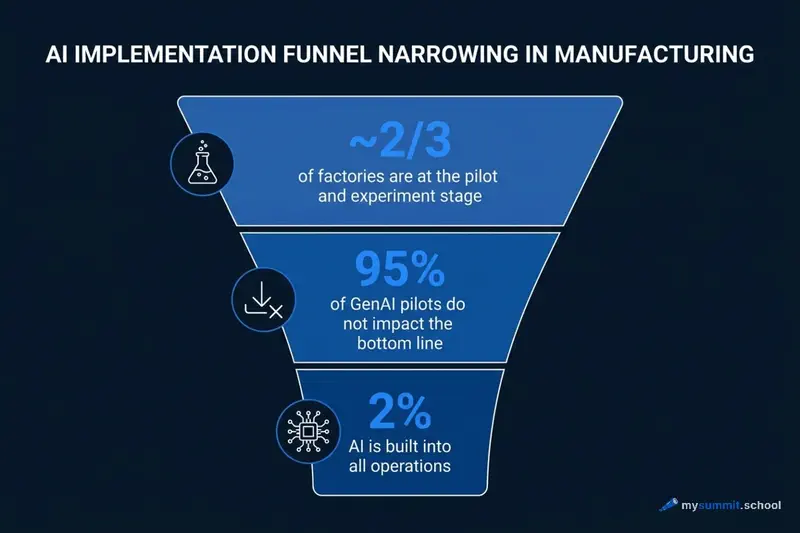
AI on the paper layer is a quick win, but not magic. It’s worth being honest: by various estimates, 40 to 90% of corporate AI investments in 2025 failed to produce a noticeable productivity gain. Money spent, no effect. Almost always the reason isn’t technology, but three traps worth keeping in mind from day one.
AI makes confident mistakes. Even good models produce an incorrect fact in 2–3% of cases – and do so in exactly the same calm tone as a correct answer. In a chat, that’s tolerable. In a shift report, a wrong batch number or inflated output figure is already a problem. Hence the ironclad rule from Step 3: a human always reads the result. AI structures the text, but the numbers remain the shift supervisor’s responsibility.
This is especially critical for part lookups. On manufacturing forums, there’s a telling case: based on an AI suggestion, a plant ordered a non-original fuse, and a drying unit overheated by more than a hundred degrees above the safety limit – only the built-in safety system prevented a disaster. The rule is simple: AI finds the information, but a human must open the link and verify specifications against the part datasheet. If you can’t see the spec sheet behind the link, don’t trust the answer. For anything safety-related, this is non-negotiable.
“The eternal pilot.” The most common reason adoption doesn’t deliver results isn’t technology failure – it’s endless testing without transitioning to operations. A plant “tries AI” for a year, but no single task ever becomes part of the daily routine. The defense against this is exactly the structure described above: one task, a measurable result within a month, the template documented in writing. Every pilot should have a date after which it either becomes a process or gets shut down.
And one more honest thought worth accepting upfront: AI doesn’t fix a broken process – it illuminates it. Where there’s no order in the data, no standard procedures, and no standard work, AI doesn’t cover those gaps – it makes them more visible. This is exactly why the same MIT research links the mass failure of corporate GenAI pilots not to the technology, but to the foundation it’s placed on. The takeaway for manufacturing is simple: start with a task where order already exists – for example, the shift report – not with chaos in procurement.
Three typical failure scenarios worth benchmarking against. These aren’t horror stories – they’re composite cases that regularly show up at manufacturing sites:
- “Shut down after two weeks.” A shift supervisor started using a cloud AI tool without clearance. On the third week, the SOC noticed outbound traffic and requested an explanation. The tool was blocked at the perimeter, the pilot leader was summoned to the security director. Remedy – Step 0.
- “Spent three months writing the spec.” A plant decided to “do it properly”: requirements document, tender, custom development for ERP integration, vendor selection. By the time the vendor showed a prototype, stakeholder interest had cooled, budget was cut, the project quietly died. Remedy – start with a web tool and one person, not with a project.
- “Knowledge left with the person.” One enthusiastic foreman assembled excellent prompts, saved hours every week – then after six months left for another company. The templates were documented nowhere, the new person starts from scratch. Remedy – by the end of the first month, record prompts in a shared document with an owner and a review date.
The more authority you give AI, the higher the cost of mistakes. As long as it’s about text, risk is minimal: the worst that happens is a rough draft you’ll correct. But once you move to autonomous scenarios (AI sends a supplier complaint on its own, creates an ERP ticket, modifies data), treat it like a diligent but inexperienced intern: limit permissions, don’t let it delete or approve without a human, verify at critical steps.
Checklist: The First 30 Days in Manufacturing
Week 0 – security clearance (often skipped, and it shouldn’t be):
- Write a one-page memo to IT security: which tool, what data, who’s using it, for how long
- Get written “no objection” from the plant director
- Check whether mobile phones are allowed in the production zone – this determines the input scenario
Week 1 – reconnaissance:
- Pick one task from the “paper layer” (ideal: shift report)
- Open a web AI tool, create an account
- Write the first prompt using the template from Step 3
- Try it on real data from one shift
Week 2 – refinement:
- Adjust the prompt based on first-attempt results (usually takes one or two iterations)
- Measure the time: how long did it take before, how long does it take now
- Record observations: what AI does well, where manual editing is needed
Week 3 – expansion:
- Show the tool to two or three colleagues (no obligation)
- Collect their prompts and compare approaches
- If the task works – document the prompt template in writing
Week 4 – decide on the next step:
- Evaluate results: is there measurable time savings?
- Choose the second task from the list
- Decide: is it time to talk to IT about integration?
By some estimates, the hidden “tax” on inefficiency eats up to 40% of potential AI savings where adoption is unstructured. The first-30-days framework is your defense against that effect.
Prompts for manufacturing tasks follow the same logic as in our general tools comparison: what matters isn’t the model, but the quality of the task formulation.
The Next Horizon: From Paper to Equipment
At the beginning of this article, we set aside “heavy” AI – computer vision, predictive maintenance, line automation. That’s the next horizon, once the paper layer is conquered. A good benchmark for what that looks like at maturity is the Sachsenmilch dairy plant in Germany: 4.6 million liters of milk per day, 24/7 production. They abandoned fixed-schedule maintenance and switched to predictive: the system analyzes vibration and component condition, warning of failure in advance. One pump replaced on time saved hundreds of thousands of euros.
And generative AI is already working alongside the “heavy” kind. According to BCG, a shop-floor GenAI assistant suggests repair strategies to maintenance technicians – down to specific parts and warehouse availability – cutting preparation from hours to minutes. It’s still the same paper layer, just pushed right up against the machine: AI doesn’t turn the wrench, but it instantly assembles the knowledge about what to fix and how.
These are a different class of tasks: they require sensors, integration, budget, and time. But the logic of entry is the same – start with one task where there’s plenty of data and the cost of downtime is clear. The only difference is that the path to this level is shorter for those who’ve already trained their team to work with AI on simple text tasks. The paper layer isn’t just a quick win – it’s training for more serious deployments.
Manufacturing differs from office work in pace, conditions, and culture – but not in the nature of the “paper layer” around operations. A shift supervisor spends as much time on reporting as a project manager spends on status updates. AI works equally well in both cases, if the task is clearly formulated.
The most unexpected thing I hear from manufacturing leaders who’ve already tried: the main value isn’t the saved minutes. The main value is that the document comes out at consistent quality, regardless of whether the person is exhausted at the end of a shift or not.
Try AI on Real Management Tasks
9 practical tasks in the open module at mysummit.school: shift report, data analysis, supplier complaint – we examine where AI helps and where it quietly makes mistakes. Free, no registration required.
Continue learning
Open the textbook and pick up where you left off

Stanislav Belyaev
Engineering Leader at Microsoft18 years leading engineering teams. Founder of mysummit.school. 700+ graduates at Yandex Practicum and Stratoplan.