AI Reports and Status Updates: A Workflow That Holds
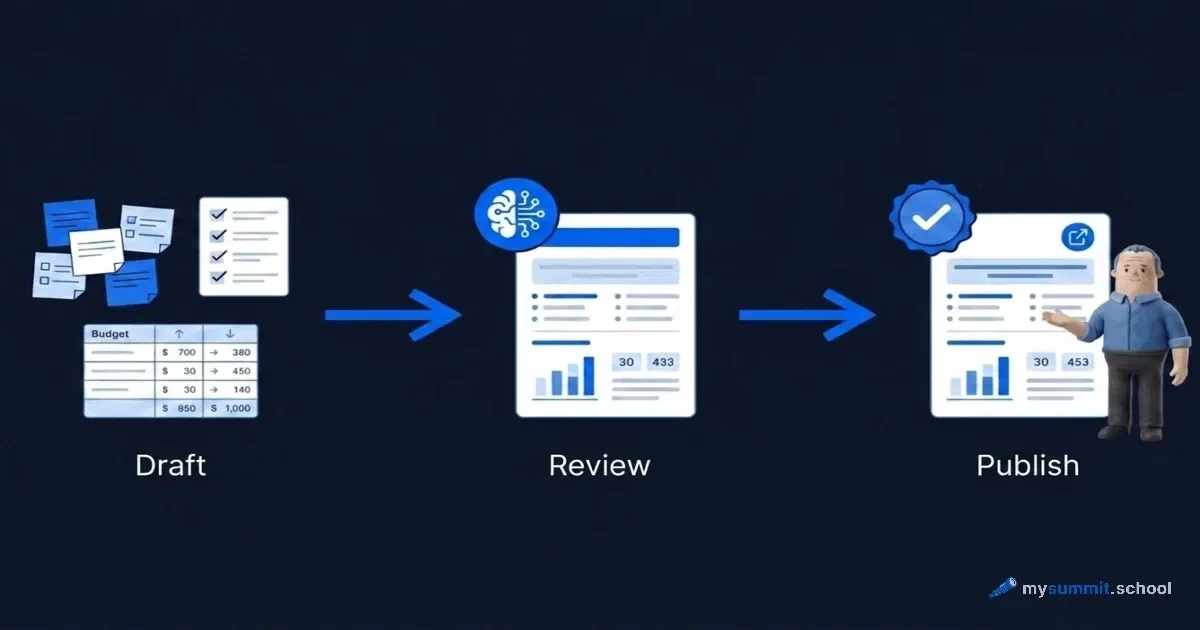
Among the answers from forty managers to the question “what task would you like to speed up with AI”, one read almost like a finished procedure. Word for word: “I would like to automate the weekly project reports and send the draft to a Jira task before I approve it and publish it myself.”
That sentence contains the whole approach most people take months to reach: AI drafts, a human checks, a human publishes. The gap between that and “AI writes the report and mails it out unchecked” is wide. One is automation that works. The other is a machine for sending the team a beautifully written lie.
Reporting and status updates came out as the second-largest group of requests (in Russian) in this data set. The weekly status for the team and for stakeholders, short summaries after meetings, monthly budget execution reports, material for the daily stand-up. The demand is real, and it lands exactly where language models are strong. Here is how to build a repeatable process around it.
First, a word on the data. Forty anonymised answers from students on the mysummit.school programme for managers, generalised to the level of task type. Not a representative sample of the market: first-hand demand from people who will try the tool on their own work tomorrow. That is precisely why the wording is worth reading. It describes real routine, not a fantasy about technology.
Why reporting is the perfect AI job
It is worth understanding the mechanism, otherwise “hand your reports to AI” sounds like the usual hype. A language model does one thing well: it takes unstructured input and reshapes it into the form you need. By Friday a manager already has the raw facts, in messages, in the tracker, in notes, in their head. The job of a status update is not to find those facts. It is to assemble them into something readable for a particular reader.
This is repackaging, and it is where the model is genuinely strong. An hour-long meeting transcript becomes a list of decisions and owners. Twenty rows exported from a tracker become three paragraphs of status. A column of budget figures becomes a narrative a non-finance person can follow. None of this is creative work. All of it is laborious: formatting, aligning, deciding what matters and what can go.
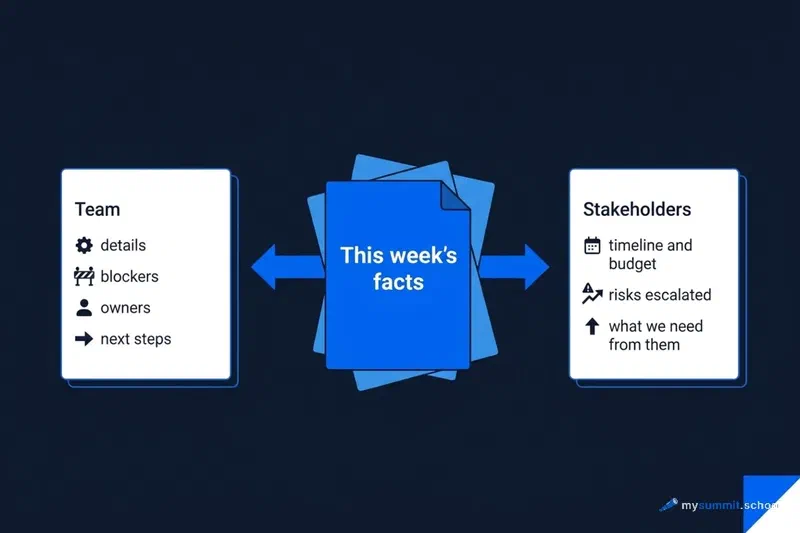
A separate gain is repackaging for different audiences. The same facts have to be presented differently to the team and to stakeholders. The team cares about detail: what exactly is blocking a task, who is picking it up, what happens next week. Stakeholders want the level above: are we on schedule and on budget, which risks need them, what decision they are being asked for. Collect the facts once and unfold them into two texts. That is the operation where AI saves the most time.
And this is where the important part starts, the reason the manager in that quote added the words “before I approve it”.
The loop that keeps out polished untruths
The temptation is obvious: if AI writes a good status, why not schedule the sending and forget the chore for good. The answer is that automatic sending is what turns a useful tool into a generator of corporate noise, and sometimes into a source of worse trouble.
A language model has a built-in trait that few people warn you about: it softens bad news. “The project is at risk of missing the deadline” comes out as “there are some challenges we are working through”. The risk you wanted to raise in bold dissolves into a diplomatic phrase. The model is not being malicious. It leans towards smooth, conflict-free text because there was more of that text in its training. And a report with the main risk smoothed over is worse than no report at all: it creates the impression that everything is under control.
So the process has three steps, and the middle one cannot be skipped.
First, the draft. AI gets the raw input and assembles it in the required format. This is where it saves you fifteen or twenty minutes of mechanical work.
Second, the human edit. You read the draft with one question in mind: what has been smoothed here, and what is here that was not in the input. You put the inconvenient truth back, the real status of the risk, the honest reason for the delay, the name of the person who owns the failure. You remove what the model made up.
Third, publication. Only after the edit does the status go out. In the words of the manager who asked for it: send the draft to the task, approve it, publish it yourself. The human stays the last link, the one who signs.
The loop does not cost you the time saving. It moves your work from writing to checking, and checking someone else’s draft is always faster than writing from scratch. What stays with you is control over what people will read.
Prompts for reporting look simple. The difficulty starts when you need the output to be exact rather than roughly right. The difference between “the AI wrote something” and “the AI added nothing that was not there” is a specific skill: specifying the task for the model. It is easier to pick up on real work situations than from theory.
Try AI on 9 real management tasks and see for yourself where it is reliable, and where it smooths things over or makes them up. Free, no sign-up.
No payment required • Get notified on launch
Three prompts you can use today
Enough theory. Below are three prompts you can copy and adapt to your own context. Each assumes the draft, edit, publish loop: the model prepares, you check.
I ran these prompts through several models from our benchmark on real project data before publishing. Claude Opus 4.6 and DeepSeek V4 Flash did best: they produce a complete status and hold the main rule, which is not to soften “we are missing the deadline” and not to invent what is not in the input. Whichever model you use, the human edit stays mandatory.
Prompt one: weekly notes into status updates for two audiences
This prompt takes your raw notes for the week and unfolds them into two texts at once, one for the team and one for stakeholders. The protection sits inside: a ban on inventing, and an instruction to escalate risks rather than smooth them.
Note the instruction about risks: “put them at the start, do not bury them at the end”. This is a direct counter to the model’s habit of drowning bad news mid-paragraph. Even with that instruction, the edit step is obligatory. Read the risks section again and make sure the wording reflects how serious things actually are, not how serious the model found it appropriate to sound.
Prompt two: meeting transcript into decisions and tasks
The request for short summaries after spoken meetings turned up in the data more than once. The meeting happened, people talked for an hour, and what was decided drifts apart in each participant’s memory. This prompt turns a transcript, or your notes, into a structure with decisions, tasks and owners.
The disagreements section is not there by accident. A meeting summary is especially prone to smoothing. If two people argued and did not agree, and the minutes say “the issue was discussed”, the argument resurfaces a week later, now with hurt feelings. Make the model record the fact of disagreement. Checking that at the edit stage is easier than repairing it afterwards.
Prompt three: budget figures into a plain narrative
Budget execution reports are a task where AI has both a strength and a dangerous weakness. The strength is turning dry figures into text a non-finance person can follow. The weakness is the arithmetic itself. So the rule is hard: you calculate percentages, variances and totals in the spreadsheet, hand the model finished numbers and ask only for the wording.
The division of labour matters here. AI is bad at arithmetic. Give it raw numbers and ask for percentages, and it may get the sum wrong while sounding certain. Workday’s report on the hidden AI tax makes the same point from another angle: some of the time saved with models goes back into fixing errors, and calculation errors are the hardest to catch. So the numbers live in your spreadsheet and the model works only with the text around them.
Where AI lets you down if you trust it
Honesty about the limits matters more than a list of capabilities. Three traps are easy to fall into when you automate reporting.
The first is smoothing, already discussed. The model leans towards conflict-free text. The main defences are the edit step and explicit instructions not to bury bad news. No instruction replaces your own read of the finished draft.
The second is invention. If the input has a hole, the model fills it with a plausible detail. No deadline in the notes, and one appears: “by the end of the quarter”. No owner named, and the model assigns the one that fits the context. That is why all three prompts ban invention and require gaps to be marked. Check that everything in the report traces back to your input.
The third is arithmetic. AI is not a calculator. Any percentages, sums and variances belong in a separate calculation; the model only phrases them. This goes beyond budget. Sprint completion, the share of closed tasks, variance from plan: anything expressed as a number should be computed outside the model.
There is a subtler risk, and it is not technical. If automated status updates become perfectly smooth and impersonal, the team stops reading them; they blend into the background of corporate mail. Research on why teams hide their AI use shows that people notice the difference between a live voice and a template, even when they cannot articulate it. A good status keeps the manager’s voice and the emphasis on what actually matters this week. AI builds the frame. Choosing the emphasis and keeping the human tone is your job. That “I will publish it myself” in the original request is about controlling the facts, and about making sure a person stands behind the text rather than a template.
The short version
Reporting and status updates are among the best AI tasks a manager has, because the work is repackaging facts you already hold rather than finding them. A meeting summary, a weekly status, a budget narrative: text and structure, where the model saves real minutes every week.
But the saving is only safe inside the draft, edit, publish loop. The manager in the original request put it better than any methodologist: draft into the task, check, approve, publish yourself. AI prepares, you sign. Skip the middle step and sooner or later you will send the team a status where the main risk has been smoothed beyond recognition and an invented deadline has been taken for a real one.
Start with one task. Take your next weekly status, or the summary of your last meeting, run it through the relevant prompt, then compare honestly how long the edit took against writing from scratch. The difference will probably surprise you. And keep one question in mind every time: what did the model smooth over in this draft, and am I ready to put my name to it?
If you want to understand which management tasks AI handles reliably and where checking is mandatory, the first module of the course is open for free.
The tool is here. Now for the skill to use it without mistakes
The foundation module at mysummit.school builds a mental model for using AI safely: which tasks to hand over without hesitation, where checking is mandatory, how to word a prompt so the model does not fill the gaps. Practised on real management situations.
Часто задаваемые вопросы
Can AI be trusted to automate weekly reports end to end?
How is a status for the team different from one for stakeholders?
Which reporting tasks are easiest to hand to AI first?
What does AI do badly when preparing reports?

mysummit.school
Engineering Leader at Microsoft18 years leading engineering teams. Founder of mysummit.school. 700+ graduates at Yandex Practicum and Stratoplan.