Google Gemini in 2026: Model Overview, NotebookLM, and Workspace Integration
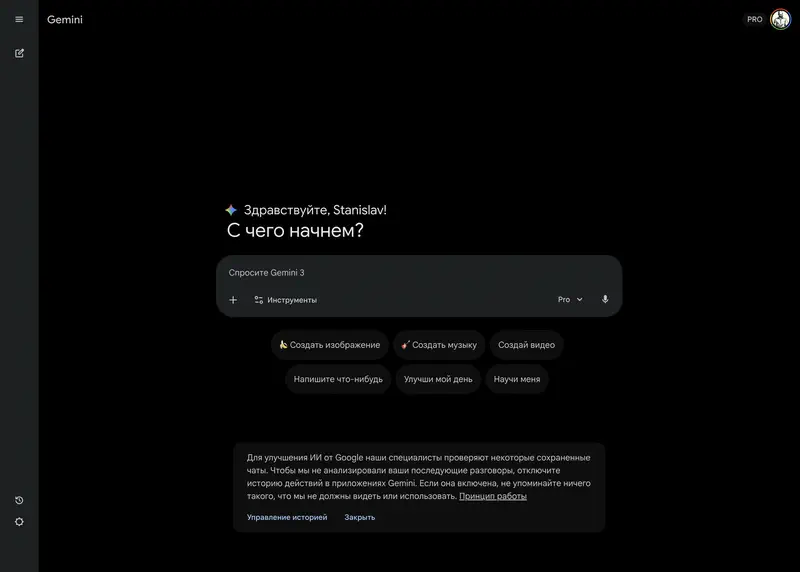
Gemini is Google’s generative AI ecosystem, which by February 2026 has become a key tool for companies deeply integrated with Google services. Its main advantage is seamless integration with Google Workspace (Docs, Sheets, Gmail, Drive) and instant access to real-time data through Google Search.
The context window of flagship models reaches 2 million tokens, enabling the analysis of massive datasets – from years of client correspondence to an entire product’s technical documentation.
Unlike competitors, Gemini is not just a chatbot – it acts as a dynamic interface to your data. The model can “see” changes in your spreadsheets and documents in real time, becoming an active participant in your business processes.
Gemini Models (February 2026)
Gemini 3.1 Pro
Gemini 3.1 Pro (February 2026) is the latest update to the flagship model, solidifying its leadership in complex planning and multimodal analysis. Unlike version 3.0, this model features an improved Long-Context Reasoning architecture, allowing it not only to “remember” 2 million tokens but to find the subtlest logical connections between disparate documents with 99.8% accuracy.
Key improvements for managers:
- In Deep Think 2.0 mode, the model cross-checks its conclusions through external sources in 3 stages, making it reliable for financial and legal audits.
- 3.1 Pro can autonomously execute multi-step tasks within Workspace – for example: “Collect all invoices from email for the quarter, reconcile them with the expense spreadsheet in Sheets, and draft a report in Docs highlighting discrepancies.”
- The model can analyze hours-long conference recordings, accurately identifying not only what was said but also the emotional tone of participants (sentiment analysis).
Gemini 3 Flash
An ultra-fast model with a 1 million token context window. It uses 30% fewer “thinking tokens” than previous versions. Ideal for routine operations: summarizing long meetings, monitoring the news agenda, processing large volumes of incoming messages. It trades depth of analysis for speed.
Gemini 2.5 Pro
The previous flagship, still relevant thanks to its balance of cost and quality. This is the model that, with its Deep Think capability, won the gold medal at the 2025 International Mathematical Olympiad. Often used as the baseline model in corporate subscriptions.
Gemma 3 – Open Models
A family of open models (1B, 4B, 12B, 27B) that can be run locally. In human evaluations, it outperforms Llama 3 and DeepSeek-V3. The Gemma 3n variant is optimized for mobile devices, while CodeGemma is designed for programming tasks within IDEs.
Gemma is an excellent choice when data cannot be sent to the cloud – for example, confidential legal documents.
Visual Models
Veo 3.1 is the leading model for video generation and dynamic presentations. Version 3.1 adds support for “interactive direction” – managers can adjust video details in real time.
Gemini 3 also features significantly improved image generation, enabling the creation of realistic infographics on demand.
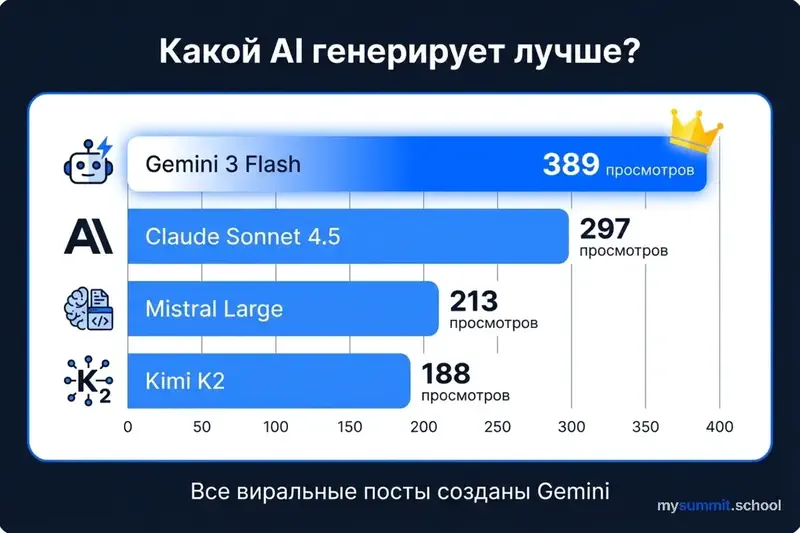
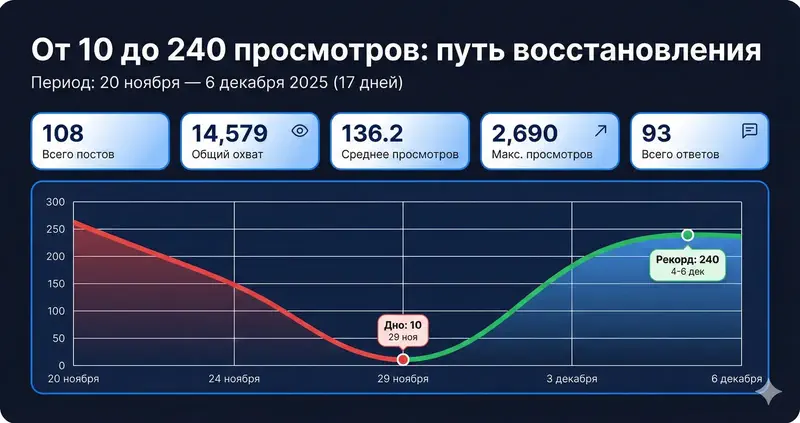
Gemini generates convincingly. The free module shows where convincing output hides errors – 9 tasks, free of charge.
No payment required • Get notified on launch
NotebookLM: Your Personal Research Hub
NotebookLM is arguably Google’s most powerful tool for deep knowledge work. Unlike a regular chat, it works exclusively with the documents you upload (a “grounding” mode), which eliminates hallucinations and data leakage.
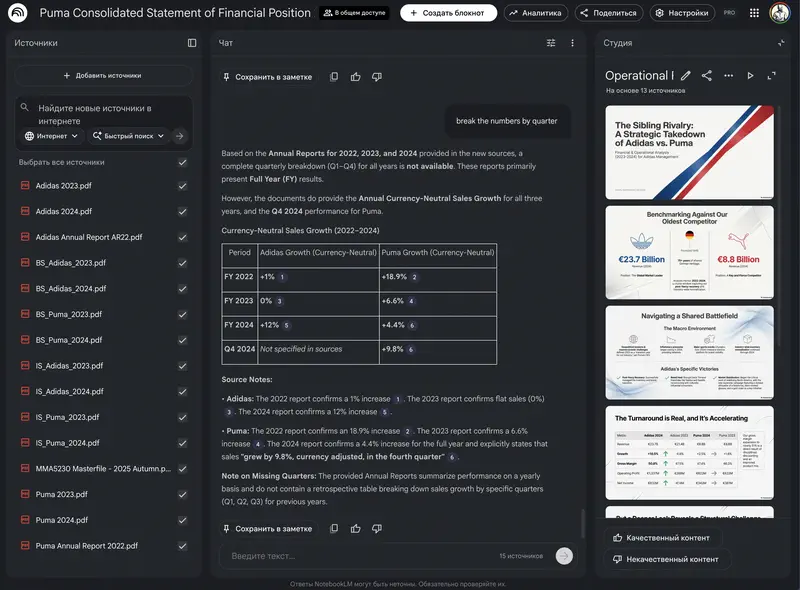
For managers, this means:
- Audio Overview (AI Podcasts) – turn a dry 50-page annual report or company strategy into a 10-minute expert dialogue you can listen to on your way to the office.
- Feedback Analysis – upload employee engagement survey results (eNPS), and NotebookLM will instantly find hidden patterns: “What is the marketing department actually worried about?”
- Team Knowledge Base – create a “living” onboarding guide where new hires can ask questions about internal processes and get answers with references to specific sections of your policies.
Custom Gems: Digital Deputies
Gems are personalized versions of Gemini that can be configured for specific roles. You explain the Gem’s task, communication style, and context once – and it’s ready to work.
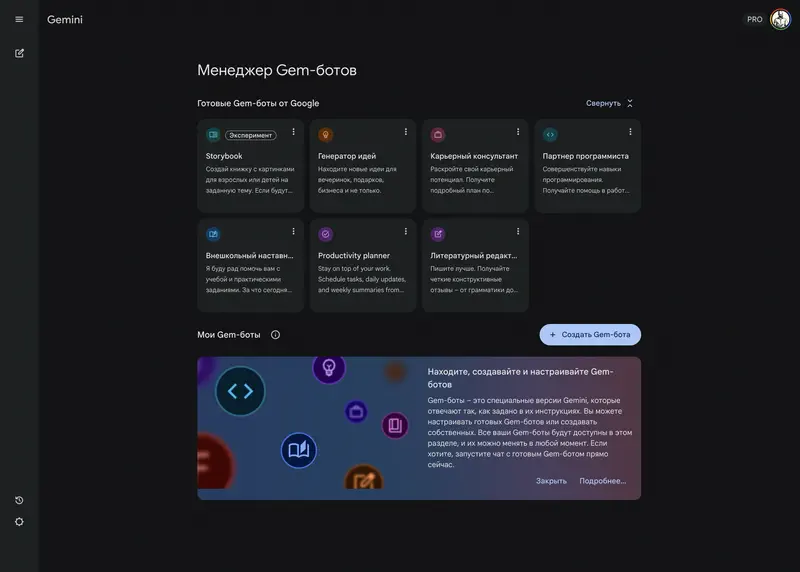
Example Gems for managers:
- Onboarding Buddy – helps new employees navigate company culture and their first tasks.
- Feedback Coach – helps managers prepare for difficult conversations by rephrasing criticism into constructive recommendations.
- Interview Assistant – generates interview questions based on the job description and candidate’s resume, then helps compare answers from different applicants.
Gems are set up. The free module offers 9 real management tasks that show what to improve in your AI workflow.
No payment required • Get notified on launch
Benefits for Managers
- Native Workspace Integration – Gemini works as a “sidekick” inside Google Docs and Gmail. It can find the right email, summarize a long Chat thread, pull numbers from a spreadsheet, and insert them directly into a document draft.
- Massive Context Window (2 million tokens) – you can upload a long workshop recording or an entire quarter’s worth of meeting notes and ask: “Summarize all agreements where budgets were mentioned.”
- Up-to-Date Information – thanks to its direct connection to Google Search, Gemini knows about the latest regulatory changes or labor market trends as of today, not as of its training cutoff.
- Google Vids – automatically create internal training videos or team update clips based on text scripts and materials from Drive.
Practical Scenarios
- Gemini 3.1 Pro: competitor analysis (web data collection + PDF report analysis), Performance Review preparation (analyzing employee achievements from Docs and Gmail over six months), team process security audit.
- Gemini 3 Flash: instant summarization of missed Meet calls, brainstorming team-building ideas, sorting and prioritizing incoming email.
- Project Mariner (Ultra plan): autonomous calendar management, booking meeting rooms, and organizing complex team travel.
- NotebookLM: creating an interactive quarterly strategy digest for the entire team.
Learn to work with Gemini inside Google Workspace
Gemini delivers maximum value when paired with Docs, Gmail, and Drive. In our course, we cover how to leverage the 2M-token context window and Gems for meeting and document analysis – even if your company hasn't switched to AI Pro yet.
Continue learning
Open the textbook and pick up where you left off
Benchmark Results
We tested three Gemini models on real-world management tasks – planning, communication, teamwork, learning & development, and regional awareness. The results were mixed.
Gemini 2.5 Pro is a solid mid-range performer. It handles planning well and shows surprisingly strong regional context awareness. However, in learning and employee development tasks, it ranks among the weakest of the major models. Communication is average.
Gemini 2.5 Flash performs nearly on par with the Pro version, which is remarkable in itself – the speed-optimized model sacrifices minimal quality. Regional awareness is an unexpectedly strong suit: the model demonstrates good knowledge of local contexts. But in team management, it falters – one of the worst results in the test.
Gemini 3 Flash presents a paradox: newer doesn’t mean better. On management tasks, this model underperforms both 2.5 versions. It handles communication and planning reasonably well, but learning and team management remain weak points.
The main takeaway: Gemini’s strength lies not in the model quality per se, but in the Google Workspace ecosystem. If you’re choosing Gemini for a “smart” AI – competitors offer more. If you’re choosing it for integration with Docs, Sheets, and Gmail – it’s still the best option.
Gemini Pricing (February 2026)
- Free: access to Gemini 3 Flash, basic image generation, integration with Google Docs/Drive.
- Google AI Pro ($19.99/month): full access to Gemini 3.1 Pro, extended context window (1M+), Gemini integration in Workspace, 2 TB storage.
- Gemini Enterprise ($30/user/month): enterprise security, priority model access, custom agent creation, and the Google Antigravity platform for IT infrastructure automation.
- Google AI Ultra ($249.99/month): for professionals – maximum limits, access to Veo 3.1, unlimited Deep Think, Project Mariner agent for full browser automation.
Limitations
- Ecosystem Dependency – Gemini delivers maximum value only within Google Workspace. If your company uses Microsoft 365, many advantages are lost.
- Ultra Plan Cost – at $249.99/month, it’s the most expensive tier among competitors, justified only for heavy use of Veo 3.1 and Project Mariner.
- Language Quality – response quality varies across languages; English remains the strongest, though the gap narrows with each update.
- Regional Restrictions – Gemini is available in most countries but not all. Check Google’s availability page for your region. If unavailable, consider alternatives like GLM-5 or DeepSeek.