How to Brief Developers with AI: Specs That Hold Up
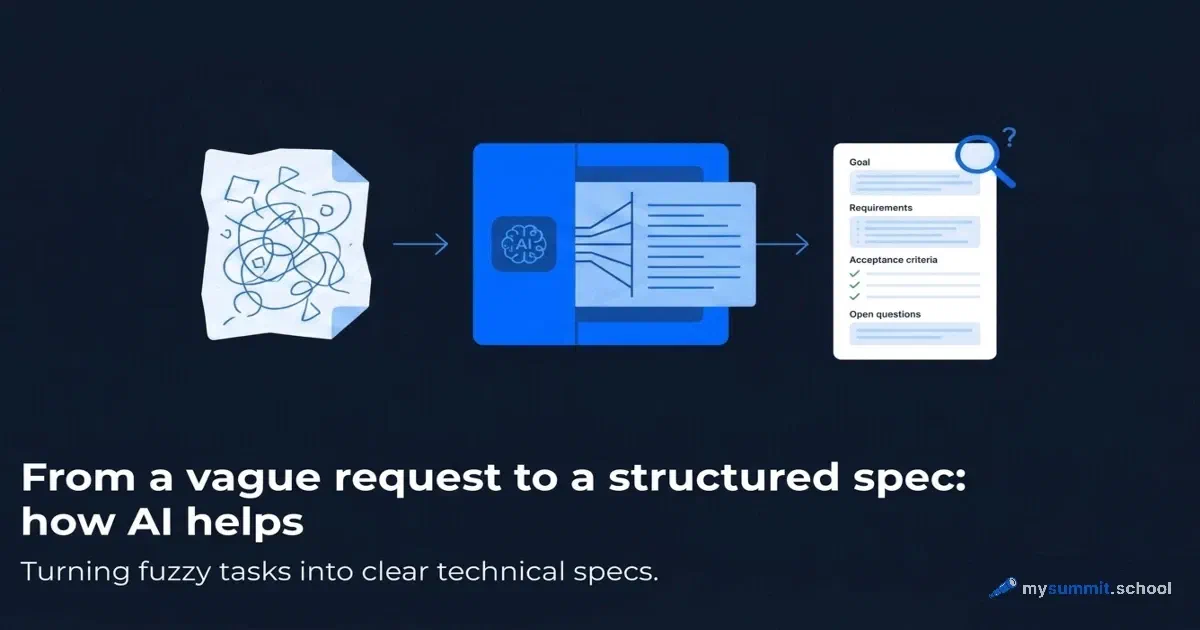
We asked forty managers which work task they would most like to speed up with AI. Open question, no options to pick from. The winner, by a wide margin, had nothing to do with polished slide decks or automated email. Answer after answer came back to the same thing: help me get tasks across to developers.
The wording varied. The pain did not. ‘Improve the quality of requirements our analysts write.’ ‘Make writing specs for developers faster.’ ‘Write user stories from the flows our analyst has drawn.’ ‘Check task descriptions before they go to the team.’ ‘Build a test plan from the requirements.’ ‘Standardise how our business analyst writes briefs.’ Project managers, product owners, analysts: all of them stuck at the same gap between ‘I know what I want’ and ’the team understood the same thing’.
Tellingly, this is exactly the task where language models are at their most reliable. Writing a brief is text work in its purest form: take a half-formed thought and give it a structure that can travel. Demand and the tool’s strength line up almost perfectly here. But between ‘AI is good at structuring text’ and ‘AI will write your spec’ there is a wide gap, and it is easy to fall into it.
One caveat before we start. Forty answers are a snapshot of a single audience: people who had already signed up to learn how to work with AI. The full analysis is in What managers want from AI: data from 40 answers (in Russian). Every example here is anonymised and reduced to the type of task – no names, no companies.
Why AI is genuinely good at briefing work
It is worth unpacking the mechanism, otherwise ‘use AI to write specs’ stays a slogan. A language model does one thing well: it takes unstructured input and forces it into a shape you specify. Three paragraphs of rough thinking become a numbered list of requirements. A description of a flow becomes a set of user stories. Finished requirements become a test plan with positive and negative cases.
A manager or an analyst usually has the understanding already. It is just not written down. It lives as ‘well, requests of certain types should stand out somehow’. The model helps you unload a thought that already exists, sort it into boxes and check it for completeness. AI covers the laborious part of briefing – formatting, consistent structure, finding the gaps – not the creative part.
This is where the real value starts. Most spec problems come from holes the author did not notice. What happens if the field is empty? Who sees this button and who does not? What counts as a successful outcome? A model that has been told not to guess will point at those holes. And the list of ‘did you think about this?’ questions is often more useful than the structure itself.
There is a third ability, less obvious: generating edge cases. Ask the model which error and empty states you might have missed in this task, and it will produce a dozen. Half will be irrelevant to your case. The other half will be exactly what surfaces in production a month later. Testers call these negative scenarios, and skipping them is the classic reason tickets get reopened.
Where it lets you down if you trust it
Now the other side, because without it this advice does more harm than good. The model does not know your domain. It has no idea that requests of a certain type cannot be edited after approval, that a regulator limits how long you may keep data, that the last release broke on this exact scenario. That context lives in your team’s heads and in closed systems the model cannot reach.
Without constraints, the model will happily fill the gaps with invention. Ask it to write a spec from one short sentence and it will add requirements, deadlines and metrics you never mentioned, and it will do so confidently and plausibly. A manager skims it, sends it to the team, the team pulls an invented requirement into the sprint, and a week disappears on something nobody asked for.
Here is what a model actually produced from the bare sentence ‘write a spec: we need to export deals to Excel’, with no constraints at all. In one pass it added: a limit of ‘50,000 or 100,000 rows’, an export that takes ’no longer than 10–20 seconds’, file storage of ‘24 hours in S3’, about twenty columns (pipeline stage, probability %, watchers), REST endpoints, a filename containing today’s date, and even a choice of library. It reads like a finished spec. None of those numbers or entities came from the request; the model made them up, confidently and plausibly. The team will treat them as facts and build a sprint around constraints the business never asked for. What makes it dangerous is the tone: an invented line looks exactly like a real one. For more on the mechanism, see why AI produces confident nonsense (in Russian).

The rule that works sounds different: AI structures what a human gave it and says plainly what is missing. The difference comes down to one instruction in the prompt: forbid invention and give the model a legitimate way to say ‘I do not know’. When the data is missing, do not guess – put the question in a separate list. What comes back is a list of things to confirm with the requester rather than a fabrication. That list is the most valuable artefact in the whole process.
There is a second boundary, organisational rather than technical. Everything you paste into a public model goes to someone else’s servers. Real customer data, internal logic, credentials, contract numbers do not belong in a prompt. Generalise to the type (‘a request of a certain kind’, ’the amount field’) and keep the specifics to yourself. If your company has a private deployment or an enterprise subscription that guarantees your data is not used for training, read the terms before you load live requirements into it.
Hence a simple rule: some work should never go to the model at all.
Where AI is a risk rather than a helper, do it by hand:
- specs with regulatory requirements (finance, healthcare, personal data): an invented line costs a fine, not a sprint;
- anything involving real customer data and access rights – it cannot go into a public model;
- impact analysis across adjacent systems – the model cannot see how they fit together, let alone predict what will break in the neighbouring team;
- exact calculations, deadlines and SLAs – these need a number you can verify, not plausibility.
Before you hand AI tasks to your team, it is worth working through a dozen typical management situations yourself and seeing where it speeds you up and where it quietly plants a plausible error. Without that, the line between strong and weak use stays theoretical.
Work through 9 real management tasks and see for yourself where AI structures reliably and where it starts inventing. Free, no sign-up.
No payment required • Get notified on launch
The workflow: from a vague request to a test plan
What follows is a sequence you can fit into your week. Each step answers one of the pains from those forty responses. The principle runs through all of it: you supply the input and the context, the model structures it and flags the gaps, you check and move on.
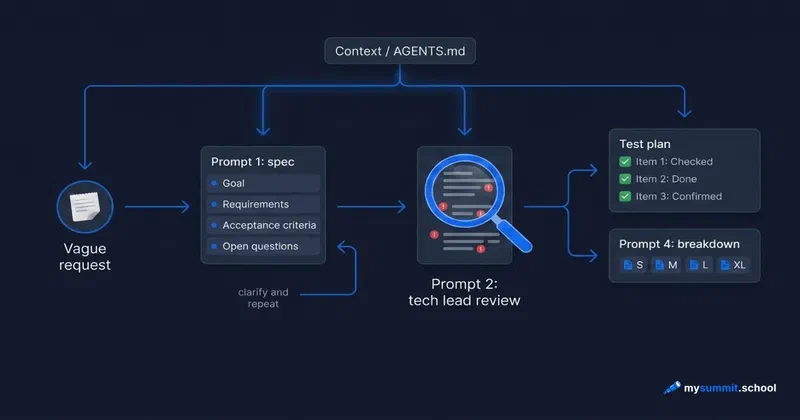
The core is two steps. First, the vague request becomes a structured spec. The input is the requester’s sentence or your own note; the output is a brief with a goal, requirements, acceptance criteria and, most importantly, a list of open questions. Second, a sceptical review: the spec goes back through the model in the role of a tech lead who does not want to waste a sprint. The job is not to patch but to expose – ambiguity, untestable criteria, missing scenarios.
The temptation is to take the output of step one straight into the sprint. The value comes from step two attacking step one: one pass gives a draft, two passes give a draft that has survived opposition. That is the ‘before it goes out’ moment one manager described as the dream. Below we run both steps on a single example.
Alongside the core there is a separate branch for analysts: if the input is not the requester’s text but a described flow or mock-up, step one is replaced by user story generation. This branch starts from a diagram and ends with stories; it does not continue from a finished spec.
Two further artefacts grow out of a finished spec, each with its own prompt, and the order between them is not fixed – take whichever you need now:
- breakdown and rough sizing – sprint tasks with dependencies and size;
- test plan – positive, negative and boundary checks derived from the acceptance criteria.
Context once: so the model stops inventing your domain
The main reason models invent things is that they do not know your system. The fix is one prepared context block you paste at the start of the conversation, before any of the prompts below, rather than a longer prompt every time. Write it once, reuse it, update it every couple of months when the product changes.
What goes in it: a short description of the product and who uses it, the key roles and their permissions, hard constraints (‘requests cannot be edited after approval’, ‘customer data may not be kept longer than N days’), your team’s vocabulary, and a couple of landmines from past releases. Half a page of facts the model cannot know on its own, not a three-page essay.
| |
This block closes exactly the gap that makes AI dangerous in briefing. With it, the list of open questions gets shorter and sharper: the model stops asking the obvious and stops inventing constraints you already know.
If you work through an agent in your development environment rather than a chat – OpenCode or Claude Code – the same block can live in an AGENTS.md file at the root of the project. The agent picks it up automatically at the start of every session, so you are not pasting context by hand each time. In effect, AGENTS.md is persistent memory about your domain that the agent consults on any task. For a fuller account of what an agent is made of, there is a separate piece: an AI agent is not a prompt.
Prompt 1: a vague request into a spec with acceptance criteria
Start with the most common case. The input is a raw sentence, often the requester’s own words. What matters in this prompt is that it does not let the model guess. Whatever is missing goes into open questions, not into an invented requirement. If you want the anatomy of a good prompt – role, task, format, constraints – see the basics of prompt structure (in Russian).
The example in the prompt is a lightly generalised version of a real sentence from the survey. The requester described a pain, not a solution: ‘requests drop out of focus’. A good brief starts by pulling that pain into the Goal section instead of jumping straight to ‘highlight them in colour’. This prompt is what stops you mistaking a symptom for the task.
And one last thing about this prompt: it gets you to the first lap. The most valuable part of its output, the open questions, still has to be closed. Go through the list, answer what you know yourself, take the rest to the requester or the analyst. Then send the answers back into the same session in one sentence – ‘here are the answers to the open questions, rewrite the brief with them’ – and get a version without holes. One pass gives you a draft with questions; the second pass with answers gives you a brief you are not embarrassed to hand over.
Prompt 2: a sceptical tech lead reviews the finished spec
The second pass matters more than the first. The model almost always assembles a reasonable structure; finding the holes in it before the team does, mid-sprint, is where the time is saved.
These two prompts together close the pain managers named most often: the quality of requirements before they reach the team. The first builds the structure, the second attacks it. Honestly, some of the tech lead’s questions will miss. The model does not know your context. But one or two out of ten usually land exactly on the thing you missed. That is what the whole exercise is for.
The defects in the example above are deliberate: ’the export must be fast’ with no number, and ’the file contains all the necessary data’ with no definition of which data. Those are exactly the untestable phrases a tech lead is supposed to catch. Run the prompt and check whether the model names them. If it does, you have just watched the process catch a vague criterion on a training example before it eats a sprint.
What it looks like in practice: from request to reviewed spec
To turn these prompts into a process rather than a set of islands, let us run the core end to end – from the requester’s sentence to a reviewed spec. We use the same sentence as in Prompt 1, about highlighting important requests.
Every example below is a real model output (gpt-5.4-nano) on these prompts, lightly trimmed.
Step 1. Prompt 1 turns the sentence into a draft spec
Goal: in the operator’s main chat list, requests of an important type are visible immediately and do not get lost in the flow of bot notifications.
Requirements: 1) highlight request chats by type to mark them as ‘important’.
Acceptance criteria: not enough data to state them unambiguously.
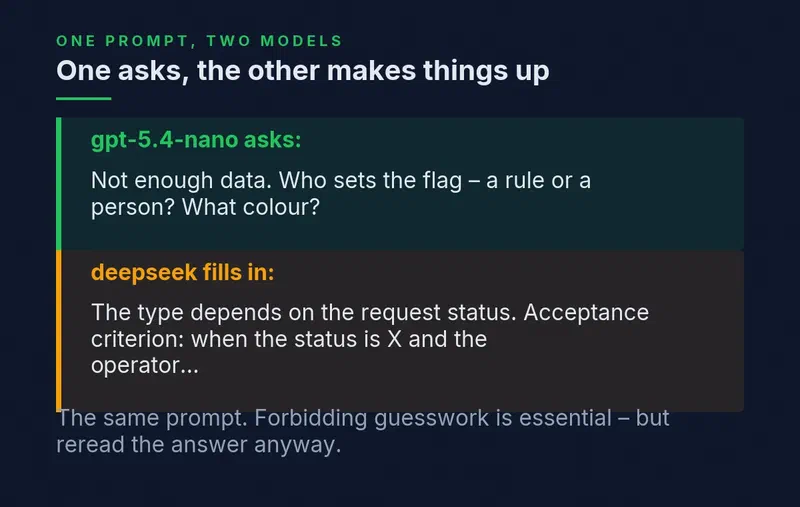
Open questions: what does ‘by type’ mean, and where does the type come from? who sets the ‘important’ flag – a rule or a person? which colour, and how is it applied (row, background, icon)? is it visible to all operators or just one? how does it interact with the existing statuses?
The important part: the model invented neither the colour nor which types count as important. Everything absent from the sentence went into open questions, and under acceptance criteria it honestly wrote ’not enough data’. That is the no-guessing rule doing its job.
A real fork in the road. We also ran the same sentence through a second model (deepseek). It behaved differently: it added a requirement of its own (’the type depends on the request status’) and wrote acceptance criteria the requester never gave. Same prompt, different models, and one invents where the other asks. That is why the no-guessing instruction is mandatory, and why you still have to read the output.
Step 2. You close the open questions
Some you can answer yourself, some go back to the requester. Suppose: the operator sets the flag by hand; it clears automatically after the customer replies, but the operator can clear it earlier; only that operator sees it; ‘important’ is a new flag on top of the statuses; several requests can be marked; ‘highlight’ means a coloured badge plus pinning important ones above unmarked ones, without reordering everything else; marked requests are visible as soon as the list opens; and the flag does not appear in a list export. Send the answers back into the same session: ‘here are the answers, rewrite the spec with them’.
Step 3. Prompt 2 attacks the rewritten spec
The sceptical tech lead in model form found exactly what is easy to miss: ‘visible immediately’ – at what rendering threshold, in numbers? how does the coloured badge interact with the existing statuses (unread / waiting / bot) and with dark mode? And a subtle one: important requests are pinned above the rest, but the order of everything else stays untouched – so what is the pinning scoped to, the current page or the whole result set? Half the remarks miss; three or four hit.
Step 4. The final spec
You write answers to the tech lead’s questions, and the model assembles the final version: it turns the answers into testable criteria and leaves in open questions whatever is still undecided (the colour palette, the scope of ‘pinning’, peak load). This version can go straight into a breakdown and a test plan:
| |
The difference between ‘sent the draft into the sprint’ and ‘sent something already reviewed’ is the whole point of the process.
Prompt 3: user stories from a described flow
One request from the survey read: ‘writing user stories from the flows our analyst has drawn’. Current models can read an image, so you can attach a mock-up or a diagram and let the model work out the branches itself. But a written description works just as well and keeps you in control: you say the logic out loud, which you already hold in your head, and you see immediately where the model understood something differently. And if the mock-up sits in a closed system or contains sensitive data, describing it in words is safer too.
Same principle as the first two: the model structures your input and honestly separates what you said from what is missing. The test plan is another frequent request from the survey, and it deserves more than one sentence, so it gets its own prompt below.
Prompt 4: breakdown and a rough estimate
A structured spec is not yet a plan. A large brief has to be cut into pieces the team can take into a sprint, put in some order, and checked for risk. This is the part where managers drown in manual work, and where the model produces a good first draft – provided you treat the estimate as a hypothesis to discuss with the team, not a commitment.
Replace the sizing scale in the prompt with the one your team uses before you run it, or the model will measure with someone else’s ruler.
Tying the scale to your team matters: without it, ‘L’ means nothing, it is just a letter. Agree the scale once, keep it in the context block, and the estimate becomes usable for planning. Even then it stays rough and deceptively confident: it is an input to a conversation with the team, not a replacement for one. The list of ‘forgotten’ technical tasks – migrations, permissions, logs – often catches exactly what later turns up as ‘we never put that in the sprint’.
On the final spec from the example above, the model broke the work down like this (a fragment of a real response): ‘Displaying the flag in the chat row – M, depends on the API contract’; ‘Automatic clearing on the customer reply event – L, risk: there may be no single customer-replied event’; and, as a separate list, the forgotten technical tasks: migrations (the flag, its owner, its lifetime), access rights, logging, error handling. It flagged the biggest risk itself.
Breakdown and estimating are no longer about briefing a single task; they are project management as a whole. That is where the Project Management specialisation begins.
Breakdown, estimates and test plans belong to the Project Management specialisation
10 lessons: AI in planning (pre-mortems, WBS, three-scenario estimates), reporting and crises. One end-to-end project from kick-off to delivery, and you leave with a working system rather than a folder of prompts.
Prompt 5: a test plan from the acceptance criteria
A test plan grows straight out of the spec. Every acceptance criterion generates checks. That is why it is easier to build from a finished brief than to write from scratch. ‘A detailed test plan for the QA team’ came up as a request in its own right, and this prompt covers it.
Note how each check is tied to an acceptance criterion. That is how you see the holes from the other side. If a criterion has no check, or a check maps to no criterion, the spec is incomplete. The test plan works as one more review pass, from a different angle.
On the same spec the model built checks and tied each one to a criterion (a fragment): positive – ‘flag set -> badge and pinning, AC1’; negative – ‘another operator does not see someone else’s flag, AC4’, ’export without the flag, AC5’; boundary – ‘5,000–10,000 chats, some flagged -> no degradation’. And it honestly moved the untestable parts into ’needs clarification’: the exact mechanics of pinning, the palette, the load threshold.
A similar approach works in neighbouring tasks. If you are speeding up handling customer enquiries (in Russian) or preparing a competitor analysis (in Russian), the principle is the same: structure the input, turn the gaps into questions.
Briefing is really about catching where AI structures reliably and where it invents. That is exactly the skill the nine lessons of the open module test. Free, no sign-up.
No payment required • Get notified on launch
A readiness checklist for the brief
Before a spec goes into work, run it through a short list. Think of it as a lightweight definition of ready. The brief is ready when:
- the goal describes the user’s problem, not the solution;
- every acceptance criterion can be checked unambiguously (precondition, action, result);
- open questions are closed or explicitly recorded as a risk;
- non-functional requirements are covered: speed, permissions, security;
- it says plainly what is out of scope;
- large pieces are split so each can be finished and checked on its own.

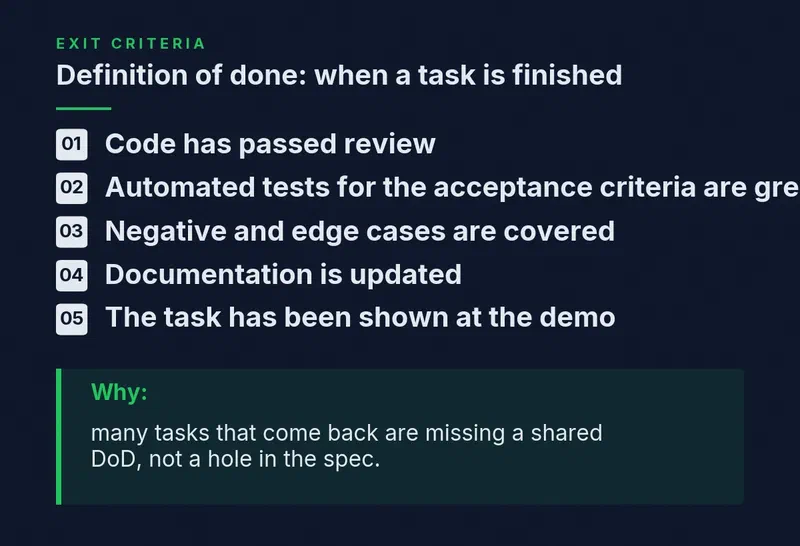
That is the entrance. At the exit, a mirror list applies – definition of done, meaning what ’the task is finished’ actually means. Fix it once for the team rather than reinventing it for every ticket: the code has been reviewed, automated tests against the acceptance criteria are green, the negative and boundary scenarios from the test plan have been checked, the documentation is updated, the task has been shown at a demo. A good share of ‘returned’ tickets have nothing wrong with the brief; the team simply never agreed on when work counts as finished.
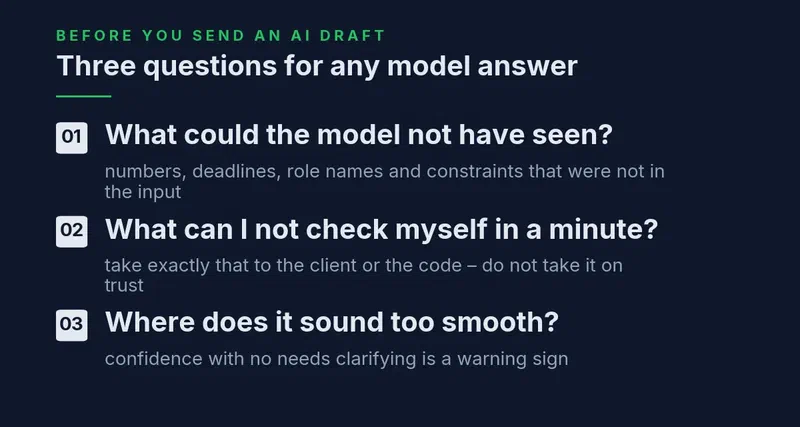
And one more check, this time of the model’s answer rather than the brief, before you send it anywhere. Three questions for any AI draft:
- What could the model not have seen here? Any number, deadline, role name or constraint that was not in your input is a candidate for invention.
- Which line can I not verify myself in a minute? That is the one to take to the requester or to the code, not to accept on trust.
- Where does it sound too smooth? A confident passage with no ’needs clarification’ anywhere is a reason to slow down, not to celebrate.
If you want to know whether AI is actually helping, track two numbers before and after: how often a ticket is sent back for clarification after it reaches development, and how many tickets are reopened because a scenario was missed. When both fall, the process works – it is not just feeling productive.
What separates a lucky one-off from a repeatable result
You can copy these prompts and get value today. But between ‘it worked once’ and ‘it works consistently’ sits a skill that does not arrive with the app install.
First, giving the model enough context without drowning it. Too little and it invents. Too much and it sinks into detail and loses the point. The line is found in practice: which tasks need one paragraph of context, and where you have to spell out the system’s constraints.
Second, checking in the right place. In briefing, the dangerous errors are the plausible ones, not the obvious ones. An invented requirement looks exactly like a real one; an invented acceptance criterion sounds as confident as a real one. The skill is knowing which lines you must check: anything touching the domain, the constraints and the numbers.
Third, knowing where AI is no help at all. If a task needs access to a closed system, an exact calculation, or verifiable current facts about your product, the model will not manage alone and will produce a confidently worded error. Writing text is its strength. Knowing your domain is not.
All three can be taught, but they do not come from reading an article. They come from a dozen tasks with a clear debrief of why something worked or did not. That is why a prompt collection will only take you so far; what moves the needle is practice with feedback.
The short version
Briefing developers turned out to be the number one request from real managers, and a sensible one. Language models are genuinely strong where a half-formed thought has to be given structure: specs, user stories, acceptance criteria, test plans. The audience had intuitively found the task where AI speeds work up most reliably.
The line between success and failure comes down to one rule: the model structures your input, and it must not invent. Forbid invention, give it a legal way to say ‘I do not know’, and the list of open questions becomes more valuable than the spec itself. Two passes instead of one – build, then attack – close that pain about requirement quality before the work reaches the team.
A prompt takes a minute to copy. Calibrating trust does not. Where to give context, what you must always check, where to stop and ask a person instead of the model. That is a skill, and it separates the manager who got one beautiful spec out of AI from the manager whose briefing is faster every week. The question for you: which of your regular tasks goes through this process first?
The tool is here. Now for the skill
The foundation of the course is what cannot be copied from a prompt: where to give context, what you must always check, where the model is reliable and where it lies. Real management tasks, error reviews, the Foundation module and the project management specialisation.
Часто задаваемые вопросы
Can AI write a spec for a manager?
Why use AI for briefing if I can write specs myself?
How do I stop AI from inventing requirements?
Does this work for user stories and test plans, not just specs?

mysummit.school
Engineering Leader at Microsoft18 years leading engineering teams. Founder of mysummit.school. 700+ graduates at Yandex Practicum and Stratoplan.