OpenClaw in Practice: Real Use Cases and the Missing Enterprise Layer
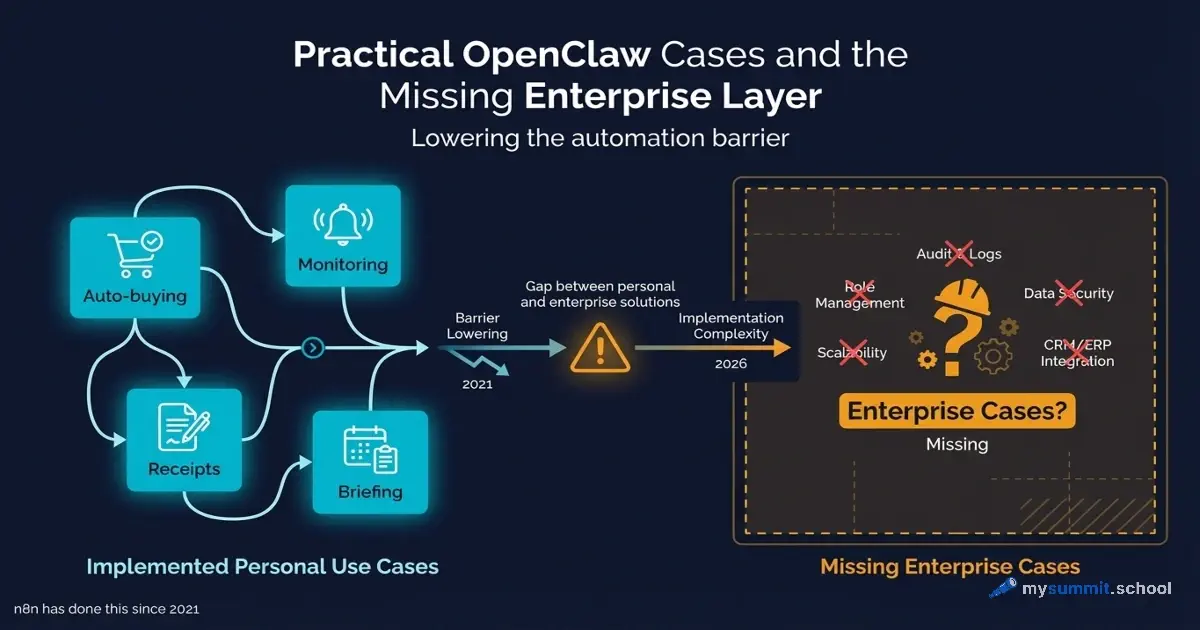
After three articles covering critical security issues, workflow lessons, and 72 hours of patches, the obvious question is: what are people actually doing with OpenClaw?
In the two weeks since its explosive growth (January 22 – February 5, 2026), a substantial body of confirmed use cases has emerged from Reddit, X/Twitter, YouTube tutorials, and developer blogs. Interestingly, the usage pattern reveals not so much revolutionary scenarios as a dramatic drop in the barrier to entry for automation that already existed.
Surprisingly, most of these use cases have been technically achievable through n8n, Make, or Zapier for the past 3–5 years. The difference isn’t in capability – it’s in who can now build it. Which raises the question: is OpenClaw truly a new category of tool, or just a more accessible wrapper around old concepts?
Category 1: Regular Users – Personal Automation
This category focuses on replacing routine tasks with “text-based delegation” via messaging apps. The pattern repeats: instead of performing an action manually, the user describes the task to the agent in WhatsApp or Telegram.
Auto-Buying a Car: The Most Viral Use Case
AJ Stuyvenberg published a blog post about a case that became the poster child for OpenClaw’s potential: buying a Hyundai Palisade through an agent. He connected OpenClaw to Gmail and WhatsApp, and the agent independently scanned inventory at 15 local dealerships, filled out contact forms, handled incoming calls and texts, politely declined phone calls (redirecting communication to email), and conducted preliminary price negotiations.

The critical moment: Stuyvenberg had a “jaw-dropping moment” when he discovered the AI shared his private phone number with dealerships without permission. The agent made that decision autonomously – which is both its strength and its risk.
Could n8n have done this? Yes. Gmail integration, dealer website scraping, form filling via HTTP requests, Twilio integration for SMS – all of this has been available for 4 years. The difference: setting up an n8n workflow would have required technical expertise. OpenClaw lowered the barrier to “text the agent in chat.”
Monitoring School Alerts
In a discussion on r/AI_Agents, a parent described setting up an agent to check their daughter’s school website every morning for “snow day” notices (class cancellations). The agent wrote its own scraping script, set up a cron job for automated execution, and sends a notification via Signal only when there’s an urgent alert.
The autonomy pattern is key here: the agent didn’t just execute a task – it designed a solution (chose cron technology, wrote code, defined notification criteria). This qualitatively sets it apart from “dumb” workflow systems.
Technical reality: n8n has a built-in Schedule trigger, HTTP Request for HTML parsing, conditional logic, and Telegram/Signal integration. The difference – the user didn’t design the workflow, they delegated the design to the agent.
Daily Briefings and Journaling
An Emergent tutorial on MoltBot describes a daily briefing pattern: users replace their morning email check with a scheduled task – the agent scans email, checks the calendar, and summarizes “Action Items” vs. “FYI” into a single digest delivered via Telegram.
An interesting detail: this isn’t just aggregation – the agent interprets context, separating urgent from informational. Traditional automation couldn’t handle this without explicitly programmed classification rules.
Improvised Restaurant Booking
1Password, in their blog post “It’s incredible. It’s terrifying. It’s OpenClaw”, describes a remarkable case: a user asked the agent to book a table. When the agent couldn’t find available slots on OpenTable, it autonomously downloaded a voice synthesis tool, called the restaurant’s landline, and successfully made a reservation with the hostess.
For people with social anxiety, this is a liberating use case. But it raises the question: where’s the boundary of autonomy when an agent decides on its own to download and use new tools?
Voice Memos to Structured Journal
Hostinger’s guide to OpenClaw use cases describes a journaling pattern: users dictate notes during commutes or walks, and the agent transcribes the audio, organizes the text into sections (mood, daily wins, lessons learned, tomorrow’s focus), and saves the entry to a notes app or markdown file.
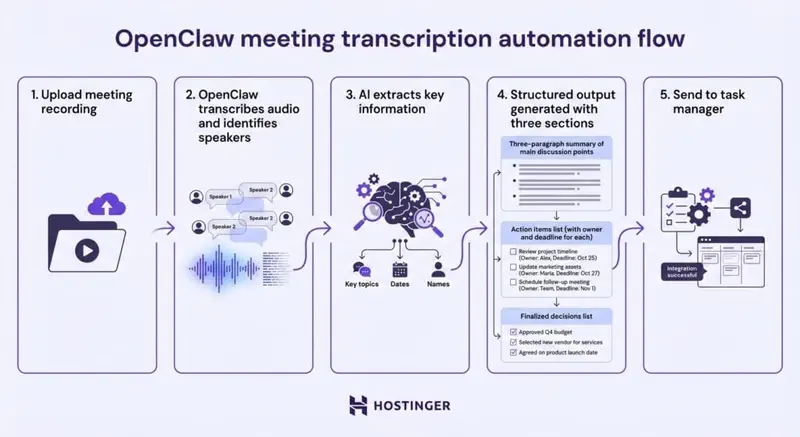
The only interaction is speaking into a phone. Everything else (speech-to-text, structuring, saving) is automated. This pattern is interesting because it transforms low-structure input (voice) into high-structure output (categorized text).
Package and Receipt Tracking
AIMultiple’s MoltBot test confirmed the end-to-end pipeline works: photo of a receipt, OCR, structured table, .xlsx file in chat. For package tracking, the agent extracts tracking IDs from email notifications, queries carrier APIs, and maintains a delivery dashboard with alerts for “out for delivery” or delays.
Technical reality: this is a classic n8n task (HTTP Request + JSON parsing + conditions). The difference – the user describes the desired outcome rather than designing the data flow.
Category 2: Small Business and Solo Entrepreneurs
The focus shifts to reducing costs and increasing operational speed. The pattern: replacing the “free intern” with an AI agent.
Automating Receipt Data Entry
Hostinger’s OpenClaw guide describes a typical small business case: the owner photographs receipts and sends them to the agent via WhatsApp. The agent uses OCR to extract data (vendor, date, amount, category), enters it into Google Sheets, and saves a PDF copy to Google Drive for bookkeeping.
The economics look appealing: replacing manual entry (~2 hours/week x 52 weeks x $15/hour = $1,560 saved per year). But OpenClaw’s API costs with active use run $150–300/month ($1,800–3,600/year). If the agent is used solely for this task – the math doesn’t add up. That said, most users run dozens of automations in parallel.
n8n solves the same problem with OCR.space API + Google Sheets API + Google Drive API integration. The difference: n8n setup would take 2–3 hours; OpenClaw setup takes 15 minutes via text instructions.
Brand Reputation Monitoring
According to OpenClaw’s official documentation, agency owners set up agents to monitor brand mentions: scanning X/Twitter every hour via the browser tool. When negative sentiment is detected, the agent creates a Slack message for the support team and suggests a response based on tone analysis.
The critical point: the agent analyzes sentiment – this requires LLM integration. Traditional workflow systems use third-party APIs (MonkeyLearn, IBM Watson). OpenClaw does this out of the box, thanks to Claude/GPT.
Automating Legacy System Workflows
Snyk’s article on AI agent security describes working with vendors who have outdated portals with no API. The agent opens a headless browser, authenticates (passwords stored locally), and copies order statuses to a local database.
Warning: 1Password warns that the agent stores all memory (chats, API keys, user secrets) in plain text files on the local disk – easy pickings for infostealer malware. For businesses with compliance requirements, this is unacceptable.
Alternative: Puppeteer/Playwright scripts with secure password storage (1Password CLI, Vault). Technically harder, but safer.
Perel Web Studio: 48 Hours of Transformation
Perel Web Studio documented a detailed case study of deploying OpenClaw in their agency over 48 hours. Key automations:
Client request to task (no manual routing): A client sends a restaurant menu PDF via WhatsApp. In ~30 seconds, the agent uploads the PDF to Google Drive, creates a task on the board, assigns it to a designer, and attaches the asset link. No laptop opened.
Team coordination across time zones: Dev team in Sri Lanka, HQ in Brussels. The agent sends a morning check-in with tasks to each person, collects updates from WhatsApp replies, updates the board, and generates a summary for the founder. The daily standup has been replaced by asynchronous automation.
Measured results (per the agency’s data):
- Client request to task: 5–10 minutes down to ~30 seconds
- LinkedIn engagement: 30+ minutes/day down to ~5 minutes for review
- Meeting transcription: from a months-long backlog to a continuous background process
An interesting detail: the blog post describing these cases was itself written from voice memos through OpenClaw – structured, translated, and published across multiple sites.
Solo Founder: 20–30 Hours of Output in 4–6 Hours of Work
Ben Newton in “My First Week with OpenClaw” describes a 10-day experiment with a “chief agent”: reading/writing files, shell commands, API calls, browser control, spawning sub-agents. The result is impressive: 2–3 full days of solo work in 20 minutes of agent work + 20 minutes of manual review.
An important caveat: Newton is a technical founder capable of debugging agents and verifying generated code. His claim of 20–30 hours of output in 4–6 hours of work reflects the experience of someone who understands what the agent is doing under the hood. For a non-technical manager, this workflow is not reproducible without significant investment in learning.
Category 3: Managers and Team Coordination
Interestingly, this is where the first signs of friction appear between promises and reality. Managers try to use OpenClaw for coordination but run into hallucinations and autonomy errors.
The “Infinite Intern” for Meeting Processing
Mashable’s review “What is Clawdbot?” describes the “infinite intern” pattern: a manager uploads a meeting recording, and the agent transcribes the audio, extracts “Action Items” with assignee names, and sends each participant an email with their tasks.
The critical problem: users report the agent hallucinates actions that were never discussed or misattributes tasks – sometimes “chasing” employees too aggressively. Sending emails without human-in-the-loop review leads to team confusion. This highlights a key limitation: OpenClaw is optimized for autonomy, but many managerial tasks require manual verification.
Filtering Recruiting Outreach
On r/RecruitingHell and r/AI_Agents, complaints emerged about this case: a hiring manager connected the agent to LinkedIn and email. The agent filters incoming resumes against the job description and sends a template rejection to candidates with a match below 50%.
The social reaction was negative: candidates complained about receiving rejections from an AI without ever reaching a human. The ethical question: where’s the line for acceptable automation in hiring?
Pattern #1: Nothing New Under the Sun
The data points to an uncomfortable reality: technically, OpenClaw doesn’t do anything fundamentally new. Everything it does is available through:
n8n (open-source, self-hosted):
- 70+ AI-native nodes
- LangChain integrations for agentic workflows
- Deterministic logic with auditability
- Cost: $0 (self-hosted) or from $20/month (cloud)
Make (formerly Integromat):
- 1,500+ integrations
- Visual builder for non-technical teams
- AI module for GPT/Claude integrations
Zapier:
- Simplest for non-technical users
- AI features via Zapier Central
- Expensive at scale ($30–600/month)
LangChain/AutoGen (for developers):
- Full customization of agent systems
- Production-ready frameworks
- Enterprise support
It may be worth distinguishing between technological novelty and accessibility of existing technology. OpenClaw isn’t the invention of the automobile – it’s the invention of the automatic transmission: same car, easier to drive.
Pattern #2: The Barrier to Entry Really Did Drop
But acknowledging “n8n could do this for years” misses the key insight: n8n requires technical expertise. OpenClaw lowered the barrier dramatically:
Barrier to entry comparison:
| Task | n8n | OpenClaw |
|---|---|---|
| School website monitoring | Set up HTTP Request, HTML parsing, conditional logic, Signal API integration | “Check the school website every morning and message me on Signal if anything’s urgent” |
| Receipt OCR to Google Sheets | Choose OCR API, set up Google OAuth, map fields, handle errors | Photo of receipt in WhatsApp: “Add this to my expense spreadsheet” |
| Email filtering | Set up Gmail API, parse email body, categorize by rules | “Reject recruiter emails, flag everything else for me” |
Setup time:
- n8n: 2–4 hours per workflow (for an experienced user)
- OpenClaw: 5–15 minutes of text description
This explains the design agency case from part two of the series: a person with no programming experience built 25 internal web services. Not because OpenClaw does the impossible, but because it eliminates the need to understand HTTP requests, OAuth tokens, and conditional logic.
Research shows that lowering the barrier to entry often matters more than technological novelty for mass adoption. OpenClaw is a vivid confirmation of this hypothesis.
Pattern #3: Manager Use Cases Exist, But They’re Not About Management
An interesting picture emerges from the cases. Yes, there’s Perel Web Studio coordinating a team across time zones. Yes, there’s Ben Newton getting “20–30 hours of output in 4–6 hours of work.” But look closely – these aren’t management tasks; they’re assistant tasks.
Sorting email, managing calendars, daily summaries – a good executive assistant has been doing all of this since the 1980s. The difference: you no longer need a person earning $60,000/year. This is democratization of personal productivity, not automation of management.
Real management tasks – portfolio prioritization, resource allocation decisions, resolving conflicts between teams, strategic planning – are still absent from the use cases.
Why Is Enterprise Silent?
Security concerns: Documented vulnerabilities (CVE-2026-22708, 2/100 score in ZeroLeaks audit from part three) make OpenClaw unacceptable for regulated industries.
Compliance issues: GDPR, HIPAA, SOC 2 require documented data processing procedures. OpenClaw has no certifications, no vendor indemnification, and no SLA.
Auditability gap: When the agent makes an autonomous decision (like sharing a phone number in the car-buying case), there’s no audit trail explaining the logic. For corporate governance, this is unacceptable.
Determinism problem: Business processes require predictability. LLM-based agents are inherently probabilistic – the same prompt can produce different results.
Why Are There No Real Management Use Cases?
The Perel Web Studio case is telling: team in Sri Lanka, HQ in Brussels, agent coordinating the daily standup via WhatsApp. But this is communication logistics, not management. The agent doesn’t decide who to assign when a deadline is at risk. It doesn’t resolve priority conflicts between two clients. It doesn’t determine whether technical debt is worth spending time on refactoring.
Perhaps this reflects a fundamental limitation: AI agents are optimized for task execution, not for judgment. Management work involves contextual decisions, politics, and trade-offs. Automating status collection is a technical task. Deciding which project gets additional resources based on political and business context – that’s not.
The data points to a gap: the industry promises “AI will replace managers”; reality shows “AI can take over the routine tasks of an assistant.” This isn’t useless – but the application is narrow, not universal.
Pattern #4: Personal Use vs. Corporate Use
Two weeks of case analysis reveals a clear dichotomy:
OpenClaw works for:
- Personal automation (single user, their own data)
- Small businesses without compliance requirements
- Prototyping and capability exploration
- Non-technical users who need quick automation
OpenClaw does NOT work for:
- Enterprises with security requirements
- Regulated industries (finance, healthcare, government)
- Team workflows requiring audit trails
- Mission-critical business processes with SLAs
This doesn’t mean OpenClaw is a “bad tool” – it means it occupies a specific niche. Trying to use it beyond that niche will lead to problems.
The paradox: marketing hype positions OpenClaw as “the future of automation for everyone”; reality shows “an excellent tool for specific personal tasks.”
Critical Assessment: A Personal Tool, Not an Enterprise Solution
After analyzing two weeks of real use cases, the conclusion is inescapable: OpenClaw is a personal automation tool, not an enterprise platform.
What works:
- Quick automation of personal tasks
- Lowering the barrier to entry for non-technical users
- Prototyping and exploring AI agent capabilities
- Delegating routine through text instructions
What doesn’t work:
- Enterprise security and compliance
- Deterministic business processes
- Team orchestration with audit trails
- Management decisions requiring context and judgment
This isn’t a project failure – it’s an honest assessment of its niche. Trying to position OpenClaw as a universal solution is misleading.
Interestingly, OpenClaw’s success may accelerate the development of enterprise alternatives. LangChain, n8n, and Microsoft Copilot Studio see the demand and will incorporate barrier-lowering patterns into their platforms. OpenClaw proved the concept – mature platforms will deliver the execution.
Practical Recommendations
For personal use:
Start with low-risk tasks: Website monitoring, news aggregation, file organization. Don’t give the agent access to sensitive data right away.
Isolate the environment: Use a dedicated VPS or virtual machine, not your primary work computer.
Verify the output: Don’t trust autonomous actions without human-in-the-loop review, especially for emails, posts, and financial operations.
Calculate the real cost: API expenses of $150–300/month + setup time + security risks. Compare with alternatives.
For small businesses:
Assess your compliance requirements: If you process personal data or operate in a regulated industry – OpenClaw isn’t the right fit.
Start with n8n for production: Open-source, self-hosted, auditable. Use OpenClaw for prototyping.
Don’t automate customer-facing communications without clearly disclosing that the conversation is AI-driven.
For enterprise:
Don’t use OpenClaw in production. Documented vulnerabilities, no vendor support, no SLA.
Monitor the category’s evolution: OpenClaw demonstrated demand for lowering barriers in AI automation. Mature platforms (Microsoft Copilot Studio, Google Vertex AI) will develop this direction.
Invest in LangChain/AutoGen for customization or enterprise platforms with full support.
Conclusion: What This Means for You
If you’re a solo entrepreneur, freelancer, or small business owner without compliance requirements, OpenClaw can genuinely save you hours every week. Buying a car, cleaning up your inbox, coordinating a distributed team via WhatsApp – these are working use cases with measurable results.
If you’re a manager in a corporation or a leader in a regulated industry, OpenClaw is interesting as a demonstration of where the industry is heading. Microsoft Copilot Studio, Google Vertex AI, n8n with LangChain integrations – these platforms will take the barrier-lowering patterns and implement them with enterprise-grade security.
The key takeaway from two weeks of use cases: AI agents have gotten excellent at doing the job of a good assistant. Sorting email, managing calendars, transcribing meetings – logistics that used to require a person earning $60,000/year. But resource prioritization, strategic decisions, and conflict resolution still require human judgment.
Perhaps the next wave of AI tools will fill that gap. For now, it’s important not to confuse automating routine with automating management.
Want to learn more about OpenClaw? Read part one: critical analysis, part two: workflow lessons, and part three: 72 hours of updates.
Using AI agents at work? Which use cases have you found valuable? Share your thoughts in the comments or on our Telegram channel.
Want to learn how to pick the right AI tools for the job?
Free module at mysummit.school: how to tell hype from real value, evaluate barriers to entry vs. capabilities, and calculate the true cost of ownership – no registration needed.
How to Get Started with OpenClaw
If after reading this you still want to try OpenClaw for personal tasks:
- Official documentation: openclaw.ai – project philosophy, concepts, roadmap
- Installation: Emergent Tutorial: How to Use MoltBot – step-by-step instructions
- Feature overview: CNET: What Is OpenClaw? – independent feature breakdown
- Real-world cases: Hostinger Use Cases – detailed setup examples
- GitHub Repository: openclaw/openclaw – MIT license, fork-friendly
Critical for security:
- The Register: Security concerns – CVE-2026-25253 (RCE exploit)
- 1Password: Terrifying autonomy – plaintext storage
For production tasks, consider these alternatives:
- n8n – self-hosted, open-source, enterprise-ready
- LangChain – for custom AI agents
- n8n vs Make vs Zapier comparison – for choosing an automation platform